
The short answerYes. Connect every enquiry channel to one CRM workflow with clear ownership and handoff rules, let automation handle routine capture, record updates and acknowledgements, and keep salespeople in charge of judgement and the conversations that matter.
The short answer
Yes. Connect every enquiry channel to one CRM workflow with clear ownership and handoff rules, let automation handle routine capture, record updates and acknowledgements, and keep salespeople in charge of judgement and the conversations that matter.
Yes, you can automate lead capture and follow-up without adding more manual work for the sales team, provided you connect each enquiry source to clear CRM, ownership and handoff rules. Automate the repetitive work. Leave the judgement calls and proper conversations with people.
Lead capture automation only saves time when it removes work. If reps still copy details between inboxes, fix duplicate records or chase leads that nobody owns, the workflow has created a second job.
Disclosure: Smart AI Solutions wrote this guide and sells the CRM, chatbot and automation services linked in it. No other supplier is named or ranked here.
Key takeaways
Sales managers usually ask the same six questions before they automate lead capture.
| Question | Practical answer |
|---|---|
| What should lead automation handle? | Routine admin: capturing details, updating records and a first pass at qualification. Acknowledgements and nurture messages can run without a rep typing each one. |
| How do you prevent CRM clutter? | Map fields, match duplicates and set record ownership before switching automation on. |
| Can a workflow qualify leads before a rep steps in? | Yes. Use agreed signals to prioritise leads, then send high-intent or uncertain cases to a person. |
| How do you make automated follow-up relevant? | Use the lead's source, request and previous replies to shape messages. Pause sequences when the situation changes. |
| How can you spot problems in the current process? | Review capture, routing, follow-up and data quality with a CRM health check. |
| What proves the workflow is working? | Measure admin time and pipeline outcomes alongside handoff completion, data quality and the prospect experience. |
What lead capture automation does, and where it starts
Lead capture records and responds to interest that a potential buyer has already shown. Lead generation finds those buyers in the first place. So automating capture helps your team handle incoming demand, but it does not create demand by itself.
Bring web forms, email, chat, social lead forms and call enquiries into one workflow so reps do not have to check every channel separately. For calls, or for sources without a direct digital connection, use the same intake form or task each time. Record the contact, source, enquiry topic and next action.

Conversational chat can collect basic contact details and intent before it creates or updates a CRM record. Less re-entry. Our AI Chatbots & Assistants are built around each client's actual customer conversations and workflows. They can capture and qualify leads, book appointments and send data to a CRM automatically.
When WhatsApp is a main enquiry channel, WhatsApp business automation can sit inside the same lead workflow. The important step is to capture the conversation and its source in a shared record, instead of leaving useful context in a separate inbox. Our guide to connecting WhatsApp enquiries to a CRM and sales team covers that connection in detail.
Connect lead capture to a CRM and keep the data usable
Every lead source should write to the same CRM fields. Map contact details, enquiry topic, source and contact preference to consistent field names and formats. Records become easier to route, report on and use in later messages.
Match new submissions to existing contacts with stable identifiers such as email address or phone number. Decide in advance whether a repeat enquiry updates the contact, creates a separate opportunity or does both. Otherwise, multiple channels can create duplicate people or conflicting sales records.
Validate essential fields at capture and standardise formats such as phone numbers and locations. Use lead enrichment only when the added information is dependable and useful. Bad data weakens lead scoring and personalisation.

Clear ownership matters as much as clean fields. Set one owner or a defined routing rule for each lead, and resolve assignment conflicts before enabling automatic routing. A notification alerts a rep. It doesn't make them accountable for the next step. For the website-form side of this, see how to connect website leads to your CRM and notify the right staff.
CRM & Sales Automation suits teams that need to find where leads stall and reduce non-selling work across the pipeline. The service audits the sales process and can implement lead scoring, automated follow-ups, pipeline intelligence and data enrichment. Where the manual work sits outside the CRM, process automation maps the process first and then automates the steps that free your team.
Qualify leads automatically, with a clear human handoff
Automated lead qualification can assess incoming interest before a sales rep gets involved, as long as the rules help prioritise instead of making the final decision. Score leads against agreed signals such as fit, stated need, enquiry type and engagement. Use the score to guide the response.
Ask only the questions needed for the next decision. Route well-qualified or high-intent leads to the right salesperson with their answers and source attached, so the rep can carry on without asking the prospect to repeat basic information.

Set escalation rules for complex questions, unusual replies, high-value opportunities and low-confidence classifications. Keep a manual review route for missing or contradictory details, and define what happens if the assigned rep does not respond.
For a tailored example of screening and routing, see AI lead qualification for financial advisors. Its qualification approach collects information through WhatsApp or web chat, scores leads against the advisor's criteria and routes suitable prospects toward a consultation.
Trigger automated follow-up that reflects each lead's context
Automated follow-up starts a response when a defined event occurs, such as a form submission or a quote being sent. Include the reason for the enquiry in the message, so the first reply addresses what the person actually asked about.
Use source, behaviour and previous replies to shape the next step. Stop or adapt a nurture sequence when someone responds, converts, opts out or is taken over by a salesperson. Don't keep sending messages that no longer fit.
Set contact-preference, consent and suppression rules before launch, then apply them across connected channels. Automate acknowledgements and reminders, and let routine lead nurturing run by itself. When a prospect needs advice, negotiation or a personal conversation, make the human next action explicit. Our guide to CRM sales automation for quicker enquiry follow-up covers response timing and cadence.
The AI-Powered Lead Follow-Up and Nurture Engine for estate agencies is designed to connect property portals, websites and social media lead forms with personalised responses and CRM activity logs. It suits a process where an enquiry needs a timely first response and continued, relevant follow-up.
For quote-based sales, AI lead follow-up for insurance brokers shows how a quote can trigger messages across WhatsApp and email. Replies that show purchase intent or raise a specific question go to the responsible broker.
Choose a setup that fits your sales process
Start with the CRM your team already uses, then map the connection each lead source needs. Prefer the simplest setup that reliably passes records, status changes and replies without making reps maintain parallel systems.
| Setup | Best fit | What to check |
|---|---|---|
| One platform | Teams whose lead sources and sales process fit the platform's built-in tools. | Field mapping, routing controls, consent rules and handoff options. |
| Connected tools | Teams that need to keep their existing CRM and connect specialist channels or services. | Duplicate handling and sync direction. Who owns each record, and what happens when a sync fails. |
Compare tools on integration fit and duplicate handling first. Then look at how each one routes and reports on leads, how it handles consent and suppression, and whether a workflow can be paused or handed to a person. A long feature list matters less than whether the system can pass the right record to the right owner and stop when a person needs to take over.
When several systems connect, define which one owns each field and which one is the source of truth. Otherwise, two tools can overwrite useful information or assign the same lead to different people.
Integrations, rules, templates and data quality need ongoing attention, so assign someone to maintain them. Our AI integration services focus on connecting existing systems, while workflow automation can help teams map and maintain repetitive processes using their current tools. If you are still choosing how website enquiries should flow into the CRM, our lead management system guide walks through that build.
Pilot the workflow and measure the work it removes
Test sample enquiries from every source before routing live leads. Include repeat submissions, missing fields, replies, opt-outs and integration failures. Each one can expose a different gap.
Start with a limited pilot and confirm that records arrive once, the correct owner is assigned, messages reflect the enquiry and exceptions reach a person. Check the whole process from capture through follow-up, not only the first automated step.
Track response time and sales admin time. Watch for duplicate or incomplete records, check that handoffs complete, and follow what happens in the pipeline. Review message quality and complaints alongside time saved. A faster workflow is not a win if the prospect experience gets worse.
Review failures and sales-team feedback regularly, then refine fields, scoring, timing and templates as the process changes. This is how sales lead automation stays useful instead of becoming another system the team has to work around.
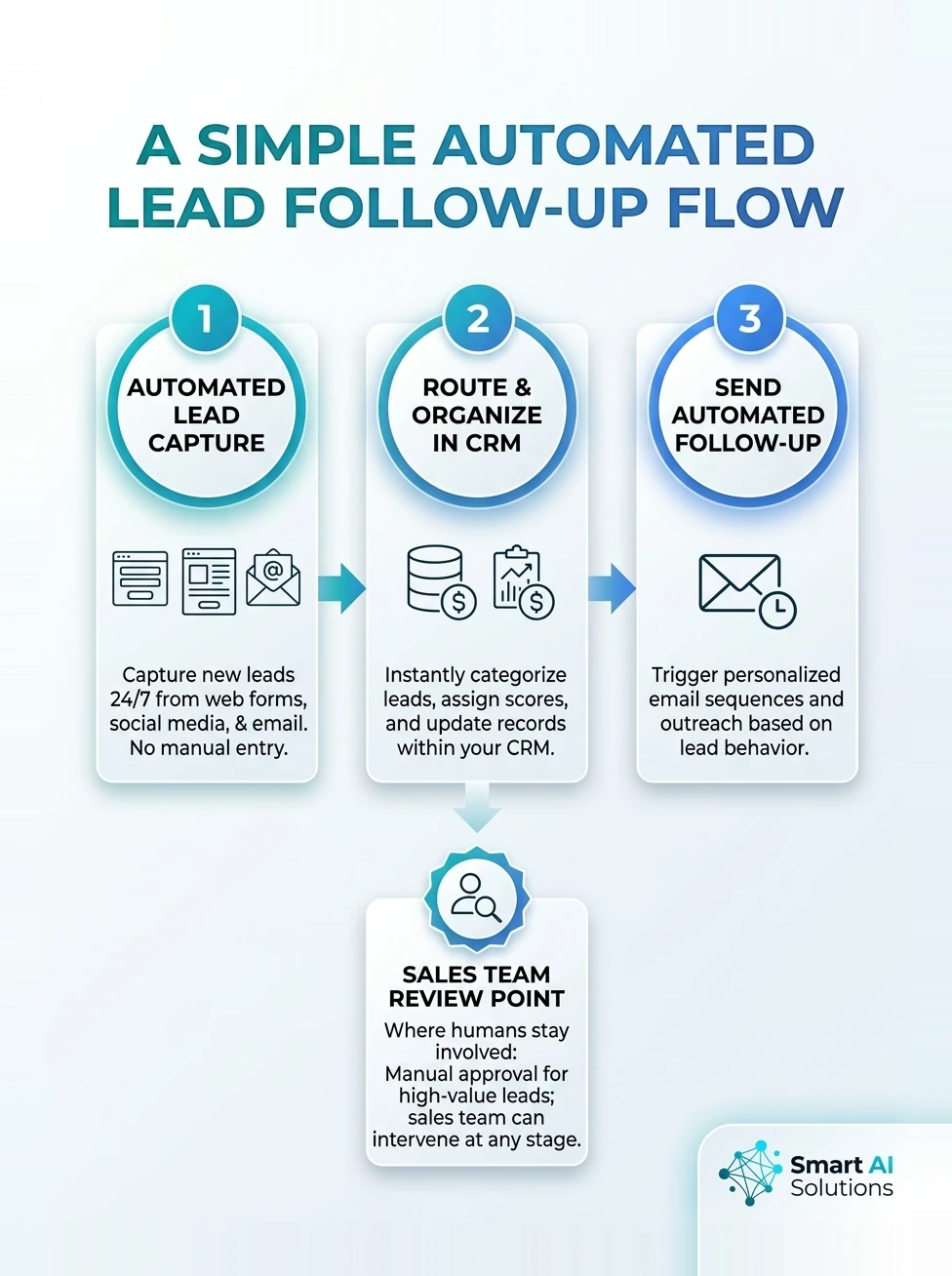
The flow below shows how a simple automated lead follow-up process can capture leads and trigger timely follow-ups without adding manual work for the sales team.
Frequently asked questions
Sales teams tend to raise these questions once a lead workflow is running.
Can lead automation support enquiries in more than one language?
Yes, automated lead capture can support multiple languages when the intake prompts, message templates and routing rules are prepared for each one. Keep language-specific wording and escalation paths consistent so a translated response does not misrepresent a product, commitment or next step.
Can I use automated lead capture for referrals as well as website enquiries?
Yes, record referrals as a distinct source and capture the referrer separately from the person being introduced. A referral does not automatically give your team permission to send every type of marketing message, so keep the contact preference tied to the referred lead.
What happens to leads already in my CRM when I launch a new workflow?
Existing CRM records can remain in place while the new workflow handles incoming enquiries. Set a clear start point for automation, so older records do not accidentally receive a fresh welcome or follow-up sequence simply because the workflow has gone live.
Can a small sales team start with just one automated part of the process?
Yes, a small team can begin with one repetitive step that has a clear trigger, such as acknowledging a new enquiry. Keep the first workflow narrow enough that the team can see whether it helps before extending automation to other stages.
Do I need AI to automate lead capture?
No. Rules-based integrations can capture structured form fields and trigger routine notifications or tasks. AI becomes more useful when a workflow needs to interpret free-text answers, identify intent in a conversation or classify enquiries that do not follow a fixed format.
How should we handle a lead who asks to be contacted later?
Record the requested date or time as a follow-up task with a named owner, instead of leaving the request buried in a conversation. Keep that timing visible in the CRM so later contact respects what the prospect asked for.
What is the best way to follow up with a lead?
Respond promptly with a message that addresses the lead's specific enquiry, using the source and any previous replies for context. Agree on a clear next step, assign an owner, and pause or adapt automated messages when the lead responds or circumstances change.
Conclusion
Can I automate lead capture and follow-up without adding more manual work for the sales team? Yes, when incoming channels feed clean CRM records, routine messages follow the lead's context, and people own the important decisions and exceptions.
Start with one well-defined workflow, test its handoffs and data, then measure both time saved and the quality of the prospect experience. That gives your team a practical way to reduce repetitive admin while keeping salespeople focused on the conversations that need them. To see where your current lead capture loses time, book a CRM health check or talk to us.