
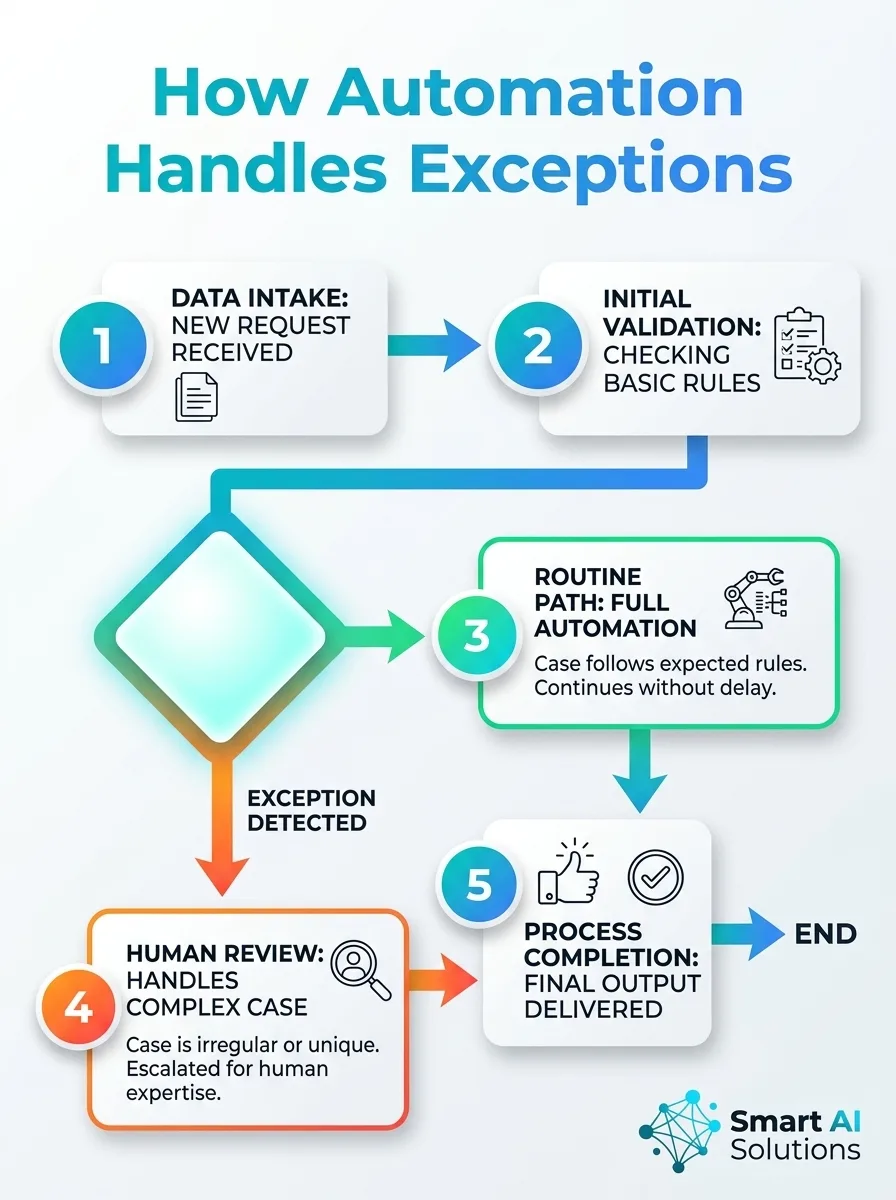
The short answerAsk what happens when a case does not fit the rule. The right provider stops the workflow on a missing document, an unusual amount or a new supplier and sends it to the right person with everything they need, so your team is no longer cleaning up after a rigid automation.
The short answer
Ask what happens when a case does not fit the rule. The right provider stops the workflow on a missing document, an unusual amount or a new supplier and sends it to the right person with everything they need, so your team is no longer cleaning up after a rigid automation.
To find a business process automation provider that can handle exceptions instead of only following fixed rules, start with the awkward case. Ask what happens when a case does not fit the rule, not how fast the tidy one runs. The right provider shows how a missing document, an unusual amount, a new supplier or a changed rule stops the workflow and reaches the right person with everything they need to decide.
That is the difference your team feels. With rigid automation, someone spends the next morning cleaning up after the first odd invoice it pushed through. With exception handling, routine work runs on its own, and unusual cases arrive in one place, already explained, for a person to settle.
Disclosure: Smart AI Solutions wrote this guide and sells the automation services linked in it. No other provider is ranked here.
Key takeaways
Six questions separate a provider that handles exceptions from one that only demos the happy path.
| Question | What to look for |
|---|---|
| What is business process automation? | Technology that carries out or coordinates repeatable business tasks, with clear steps from trigger to outcome. |
| How does exception-capable automation go beyond fixed rules? | It combines workflow logic with interpretation of variable inputs, checks what it reads and routes the cases it cannot settle. |
| Which process is a good place to start? | A repeatable process whose normal path, decision points and known exceptions are understood. |
| What should happen when a case is uncertain? | The workflow pauses or escalates it, with enough context for a person to decide quickly. |
| How should a business prepare? | Map the process, gather representative records and agree on rules, approvals and who owns each type of exception. |
| How should a pilot be judged? | Measure resolution, rework and the audit trail alongside processing time and how much work runs on its own. |
For a process-mapping starting point, see our workflow automation service for South African businesses. To connect the systems you already use, see our AI integration services.
What exception-capable automation does differently
Your team stops cleaning up after an automation once it knows what to do with the cases that do not fit. Business process automation uses technology to carry out or coordinate repeatable tasks, such as moving information between systems or sending a case for approval. Intelligent automation adds interpretation where information or decisions need it, so the process can deal with more than a fixed sequence of steps.
Robotic process automation (RPA) bots work on application screens: they click, copy data and fill in forms. That can speed up a stable task, but screen work alone does not make a bot able to judge an unusual case. Our guide to RPA vs AI automation covers that comparison in more depth; here, the test is what happens when a case breaks the rule. The difference between RPA and wider process automation is explained in business process automation vs RPA.
Exceptions in day-to-day business look ordinary:
- Missing data: an invoice arrives without a purchase order number, or a form skips a required field.
- Unusual amounts: a supplier bills far more than its usual pattern, or a credit note appears where none was expected.
- A new supplier: the name, bank details or format has never been seen before.
- A changed rule: an approval limit or policy moved last month, and old cases still follow the old one.
- Conflicting records: two systems hold different values for the same detail, and nobody has said which one wins.
For documents with different layouts, AI can extract and interpret the information. Business rules and workflow logic then check the extracted details, let straightforward cases continue and route the exceptions for review.
When you assess a provider, ask how its system detects errors, monitors running workflows and hands a case to the right person. A convincing proposal explains what happens after the normal path breaks, not just how the routine task runs.
Map the process and its exceptions before automating
Fewer surprises after go-live start on paper: nobody can automate exceptions they have not written down. Start by mapping the current process from trigger to outcome: the normal path, decisions, approvals, handoffs, systems and the known exception paths. Then the provider can see what the automation must handle.
Settle unclear or frequently changing steps before automating them. Automate a messy process and you get the same mess, faster.

Choose a process that is repeatable and well understood, then name an owner for each exception queue. Without a clear owner, unusual cases sit unresolved even when the automation flags them correctly.
Prepare process instructions, representative records, business rules, approval requirements and examples of past exceptions. These give the provider real conditions to design and test against, rather than a tidy description of an ideal process. Our automation readiness assessment guide walks through that preparation step by step.
For each handoff, record what information the next person needs and which outcomes they can choose. That turns the process map into something useful for system design, team handover and testing, not just documentation. Our logistics dispatch SOP audit case study shows what that mapping looks like on a real operation.
Ask the provider to draw the map in BPMN or another notation your staff can read, showing the normal route, decision points, exceptions and handoffs. If your team cannot check the map, pause before approving a build.
Test how the provider detects and routes exceptions
You want to see the awkward case land with a person, already explained, because a demo of the routine case tells you almost nothing. Ask the provider to run cases with incomplete records, conflicting inputs, missing documents and a changed business rule. These show whether the automation can recognise uncertainty instead of treating every input as a routine success.
Look for the whole exception lifecycle: a defined category, an assigned owner, resolution steps, escalation paths and a record of how the case was resolved. Your team gets a manageable queue instead of a catch-all error list nobody wants to open. Ask as well what happens to cases that sit in the queue past their deadline, and how a resolved case re-enters the workflow.
For multi-step processes, check that the workflow can pause a case, route it, and resume it across conditional steps and approvals. A one-step task automation is not enough when a decision or sign-off changes what happens next.
Recurring exceptions should feed back into the process. Ask how the provider reviews those cases and turns the patterns into revised rules or workflow changes, instead of quietly counting unusual outcomes as successful automation.
Our process automation service in Cape Town CBD combines RPA, workflow automation and document processing with human-in-the-loop escalation and connections to your existing systems. Exceptions go to a person with the full context of the case.
Demo prompt: Show what happens when a required document is missing, a record conflicts with another system and an approval rule changes. Then show how a person receives the case and how the workflow resumes after it is resolved.
Match AI and rules to the inputs and decisions
Your people get called only when a case needs judgement if clear rules stay clear rules. Use deterministic business rules for repeatable checks, such as a business rules engine comparing an amount with an approval limit. Keep AI interpretation for inputs or decisions that need it. Together, the two make it easier to explain why a case passed, paused or was flagged.
Each tool has its own job in an exception-capable process:
| Tool | Best suited to | Role when a case breaks the rule |
|---|---|---|
| Business rules | Stable decisions with explicit conditions | Applies the same check every time and stops when a condition is not met. |
| RPA | Screen work in systems without a convenient integration | Does the routine clicks and data entry, while the workflow routes errors for review. |
| AI | Variable inputs, such as emails or documents with different layouts | Extracts or classifies information and holds uncertain results for a person. |
| Workflow orchestration | Coordinating steps, people, systems, deadlines and approvals | Controls handoffs, escalation, status tracking and what happens after an exception is raised. |
For varied or unstructured documents, check whether the system can extract the required fields and validate them against related records. Extraction alone does not prove a case is correct, so the workflow should test the information before acting on it.

Ask how the workflow handles missing or conflicting information. When the evidence is not enough, it should pause for review instead of guessing and pushing a possibly wrong result downstream.
Invoice processing is a practical test. Ask the provider to compare extracted invoice details against purchase orders and delivery receipts (a three-way match), then route mismatches for approval rather than posting them as routine.
Our AP and AR invoice processing automation for shared services applies this pattern to supplier invoices: AI extracts invoice data in different formats, validates it against purchase orders and delivery receipts, routes exceptions for approval and posts to the general ledger. It is a useful example when you want to see document reading, validation and exception routing working together.
Set human-review thresholds and decision controls
The fear behind most automation projects is simple: something wrong goes out under your name. Set confidence thresholds by the impact and reversibility of each decision. A low-risk action that is easy to undo may suit automated handling, while a high-impact or uncertain case goes to a person.
Define which exceptions need approval, who can override an automated decision and how unresolved cases escalate. Don't expect AI to settle every exception without human review. It won't, and a provider who says otherwise has not watched a month of real invoices.
We roll this out in three stages, so trust is earned before anything runs unattended:
- The workflow drafts and you approve. It prepares every action and every exception summary, and a person approves it. Nothing reaches your customers or suppliers without your approval.
- Routine cases run on their own. Once the drafts prove right, routine cases go through automatically while you stay informed, and the unusual ones still come to a person.
- Hands-off, only when you choose. More of the process runs unattended only when you decide the record justifies it.
Keep an audit trail showing the input, the automated action, the rule or decision applied, any escalation, the human resolution and any override. You can then review how a decision happened, not just its final status.
Agree before launch how a wrong action will be contained. Depending on the process, that can mean approval gates, restricted permissions, a written reversal procedure or a pause on further actions until a reviewer steps in.
Complex claims need particular care, because adjusters must keep oversight and receive enough case context to decide in good time. Our claims automation from first notice of loss to payment covers intake, document extraction, validation, fraud flagging, reserve recommendation and payment routing, with adjuster oversight for complex claims.
Check integrations, access and information governance
An exception saves your team time only if it lands in a system they already work in. Ask how the workflow connects to the systems where its source data and outcomes live, and what happens when a connection fails. Disconnected steps create duplicate work and inconsistent records, so the provider should explain how it detects and handles failed transfers.
Clarify who can access process data, exception queues and audit records. Ask how permissions work for your staff and for the provider's team, and how access changes when responsibilities change.
For personal information processed in South Africa, clarify your organisation's and the provider's responsibilities under POPIA, the purposes for processing, the safeguards and where the data is hosted. Approval records, automated actions and human overrides should stay traceable across every system involved. Our guide to preparing your business data before AI integration covers the data side.
Good governance ties the workflow to the people accountable for its outcomes. Write down who owns access decisions, who reviews audit records and who approves changes to rules or integrations.
Pilot with realistic cases and meaningful measures
A small pilot shows you where the workflow bends before your customers do. Run it with representative normal cases and edge cases, including incomplete records, conflicting inputs and rule changes, before extending automation to more processes.
Measure exception volumes, unresolved cases, time to resolution, rework, escalation outcomes and audit completeness alongside processing time and how much work runs on its own. Speed alone cannot show whether exception handling is reliable.
Review false approvals and unnecessary escalations with the process owners. Adjust rules, confidence thresholds, training examples or the workflow design based on what the cases show.
Agree on monitoring, maintenance and ownership of process changes before launch, so the business has a clear way to respond when systems, policies or the process itself change. Get the provider's ongoing duties in writing. A build handover, managed monitoring, integration maintenance and model updates are separate commitments, and you should know which ones are included.
| Pilot measure | What it helps you assess |
|---|---|
| Unresolved cases and time to resolution | Whether exceptions reach an owner and move through the queue. |
| Rework and false approvals | Whether the automation accepts cases that needed correction or review. |
| Escalation outcomes | Whether a person receives the right context and can resolve the case. |
| Audit completeness | Whether the organisation can trace actions, decisions and overrides. |
What working with us looks like
Fewer repetitive tasks for your team is the point, and the setup is done for you. Our business process automation service starts by mapping your workflows, then designs, builds and tests the automation with you, with error handling, monitoring and your team trained to manage it. We usually build on n8n, Make.com or Zapier, chosen to suit how complex the work is and how sensitive the data.
You should see a first real result within 48 hours of go-live. Nothing reaches your customers without your approval while you are in stage one, and a named person checks in during the first weeks and answers quickly. Process automation is priced from R30,000 per workflow; see pricing for the other services.
Frequently asked questions
How can a provider demonstrate that its automation handles real-world exceptions?
Ask for a replayable demonstration where the provider changes an input or business rule and shows the resulting case history. The record should let you tell an automated resolution apart from a human decision or an unresolved outcome.
What information should a business prepare before an automation assessment?
Alongside process documents and examples, prepare a data dictionary that explains the important fields and the abbreviations your team uses. Identify which system is authoritative when records disagree, so the provider can design validation around the right source.
How should exception handling be reviewed after a pilot?
Break results down by exception category and business impact, rather than relying on one overall success rate. Have the process owner review a sample of resolved and escalated cases to confirm the recorded outcome matches the decision that was actually made.
How often should confidence thresholds and exception rules be revisited?
Revisit them whenever a policy, source system, risk tolerance or decision authority changes. Set a regular governance review as well, so gradual shifts in case patterns do not go unnoticed.
What should an organisation clarify about data hosting when choosing an automation provider in South Africa?
Ask where live data, backups and support copies are stored, and whether subprocessors can access them from other locations. Also agree retention and deletion arrangements, and how the provider will tell you about a security incident affecting the workflow.
What should we include in an automation handover?
Ask for the current process map, the workflow configuration, integration details, exception definitions, escalation owners, test results and operating instructions. Include a named contact and a clear way to report failures or request changes.
Can a small business use exception handling without a large AI programme?
Yes. Start with one contained workflow, a short list of exception categories and a human review path for uncertain cases.
What should we do if the same exceptions keep returning to the review queue?
Group them by cause, such as missing source data, an unclear policy or an integration failure, and give each cause an owner. Do not lower confidence thresholds just to shrink the queue if that raises the risk of a wrong action.
Conclusion
When you find a business process automation provider that can handle exceptions instead of only following fixed rules, your team stops cleaning up after a rigid automation, and the unusual cases arrive at the right person with everything they need. Judge providers on the whole exception lifecycle: how the system detects unusual inputs, routes cases, involves people, records decisions and improves over time.
Start with one problem: the supplier invoices that keep bouncing back for missing details, through our business process automation service. Once that queue runs cleanly, add the next one: connect the systems your exceptions touch through our AI integration services, so nobody retypes a resolved case. Tell us which process is eating your week.