The short answerDone properly, your team stops copying emails, meetings and files into the CRM by hand, and every customer record is complete without anyone chasing it.
The short answer
Done properly, your team stops copying emails, meetings and files into the CRM by hand, and every customer record is complete without anyone chasing it.
What AI integration service can connect Microsoft 365, Google Workspace and our CRM? Choose a systems-first integration service that checks which Microsoft 365 and Google Workspace apps you use, your CRM edition and what each connector can actually do, then builds and tests the workflow around the tools your team already uses. Done properly, your team stops copying emails, meetings and files into the CRM by hand, and every customer record is complete without anyone chasing it.
Smart AI Solutions does this work and stays with you after launch. This guide covers what should flow where, the four ways to make the connection, how to check a service before you sign, and how a safe rollout runs.
Disclosure: Smart AI Solutions wrote this guide and sells the services linked in it.
Some neighbouring questions have their own guides, so they are not repeated here. Whether one assistant can answer from both suites while respecting each person's access is covered in our Microsoft 365 and Google Workspace permissions guide. Choosing a partner that connects your systems without replacing them is covered in our system integration guide, and sending website leads into the CRM in our CRM integration guide. For the general mechanics, see API integration practice, the integration checklist and preparing business data before AI integration.
Key takeaways
Six answers settle most of the decision.
| Question | Practical answer |
|---|---|
| Which AI works with Microsoft 365 and Google Workspace? | Copilot and Gemini add AI inside their own suites. Joining both suites to a CRM workflow usually needs a separate integration layer. |
| Can one integration platform connect all three? | Yes, if it supports the exact Microsoft, Google and CRM connections and the actions your workflow needs. |
| What should we map first? | One real task, then the emails, calendar events, files and CRM fields it touches. |
| How do we prevent wrong CRM changes? | Set field mapping and source-of-truth rules, and keep a person approving consequential updates. |
| What does a safe rollout look like? | One bounded workflow on controlled data, tested failure handling and a written way to undo a wrong update. |
| Where do we start? | Compare the work involved in our AI integration and automation services, then scope one workflow before anything is built. |
What should land on the customer record, and from where
Your staff should not have to retype an enquiry, log a meeting or attach a proposal to the CRM after they have already done the real work in Outlook or Gmail. A connected workflow puts each item on the right customer record as it happens, with a person checking anything that changes a record.
| Where the work happens | What the CRM should receive | What a person still checks |
|---|---|---|
| Enquiry email in Outlook or Gmail | The sender matched to an existing contact, or a new lead with the enquiry attached as an activity | New contacts and any field the email changes |
| Shared sales or info mailbox | The enquiry assigned to the right owner on the record | Messages the rules cannot match |
| Meeting in Outlook Calendar or Google Calendar | The meeting logged against the contact and deal, with a follow-up task | Meetings with people who are not yet in the CRM |
| Meeting notes or a summary | A draft note on the record, linked to the meeting | The summary, before it is saved |
| Proposal or contract in SharePoint, OneDrive or Google Drive | A link to the file on the deal, not a second copy | Which version is the current one |
| Spreadsheet in Excel or Google Sheets | Extracted values, such as quantities or order details, proposed for the record | Every value, against the source cell |
Microsoft 365 Copilot and Gemini in Google Workspace bring AI into their own suites. Using either does not, by itself, create a workflow that spans both suites and your CRM. Many businesses run both, for example Microsoft 365 for finance and Google Workspace for a sales team or a newer branch. Do not switch suites just to get one AI feature. Weigh the migration, retraining and disruption against extending the tools people already use.
Four ways to connect Microsoft 365, Google Workspace and a CRM
Each route suits a different kind of work, so start from the task and let the vendor follow. The routes also differ in setup effort, in how much control you keep and in what you'll be maintaining a year from now.
| Route | Best when | What you take on |
|---|---|---|
| Your CRM's own add-in for Outlook or Gmail | Logging emails and meetings from one suite into that CRM | Check whether it also covers the other suite, shared mailboxes and files |
| Built-in AI in each suite | People need help drafting or summarising inside Outlook, Word, Gmail or Docs | Licensing and admin settings per suite. It does not move data into the CRM on its own. |
| An integration platform (iPaaS) with ready-made connectors | Defined, repeatable actions between apps, such as "new enquiry email creates a CRM activity" | Building each workflow and keeping it running, or paying someone to do it |
| A custom integration | The process needs specific logic, several systems or particular data handling | More design, testing and ongoing support |
Most CRM vendors offer an Outlook CRM add-in, a CRM for Gmail extension or both, and for one team in one suite that may be enough. The gap shows when the business runs both suites. A Microsoft 365 CRM such as Dynamics 365 connects naturally to Outlook, and a Google Workspace CRM add-on suits Gmail, but neither joins the other suite's mail, calendar and files to the same customer record. That is the email to CRM step this guide is about.
An integration platform as a service (iPaaS), such as Workato, Zapier or Microsoft Power Automate, gives you connectors for Microsoft 365, Google Workspace and most CRMs. It's a toolset, though. Someone still has to map the fields, decide what happens when an email matches two contacts, and fix the workflow when a connector changes. An integration service is the team that does that work, on an integration platform or with custom code, and stays responsible for it.
AI agents can run multi-step tasks, such as reading an enquiry, finding the contact and preparing an update for review. They do not create a separate permission model. Define what each agent may do, where it may act and when a person takes over. When the work goes beyond an assistant inside one app, our guide to AI as a service and custom automation explains that delivery model.

Check the exact connectors and actions before choosing a service
A connector on a vendor's list may still not do your job, and you don't want to learn that after signing. Write down your CRM and its edition, and the Microsoft 365 and Google Workspace apps involved. Then check each connection separately, because a broad compatibility claim does not tell you whether your setup can read and update the data you need.
- Read is not write. A connection that can fetch a contact or an email may not be able to create a CRM record, update a field, send a message or add a calendar event. List the actions the workflow needs and confirm each one.
- Both suites in one workflow. Ask whether a Microsoft connection and a Google connection can sit in the same workflow, and which direction data can move.
- Permissions per connection. Microsoft Graph, Google's APIs and your CRM's own API each expose different permissions and operations. Map them against the task.
- Failed actions. Ask what happens when an action fails: is it retried, flagged to a person or silently dropped?
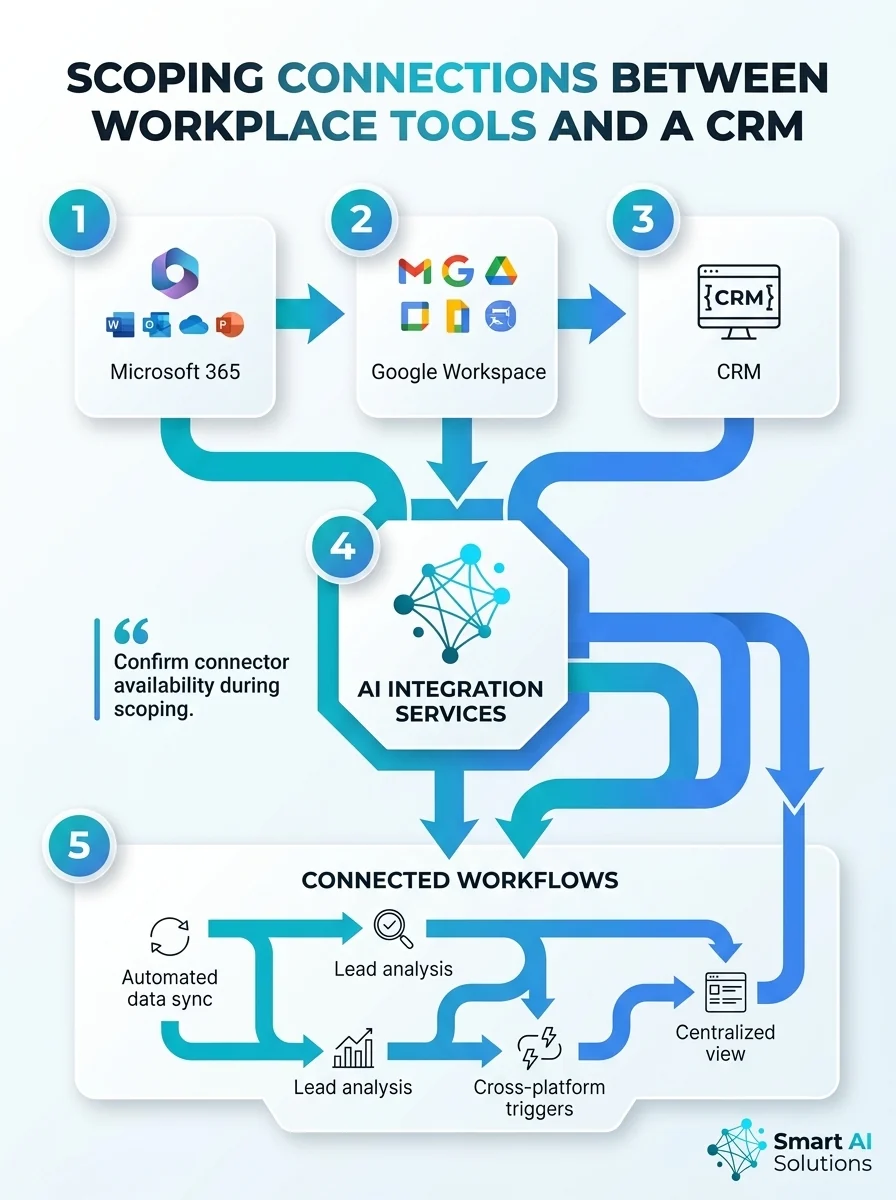
Our AI Integration Services start by investigating your existing systems, then design the connections and build them in steps, keeping the systems that already work. For a South African team that wants the local scope, AI integration services in Cape Town describe system connections, validation, exception handling and audit trails. Use the scoping conversation to confirm the exact connectors and actions for your own setup.

Decide which system owns each customer detail
Customer records stay trustworthy when every field has one owner, so nobody wonders which version is right. Map every field explicitly. For example, state that the email sender's address matches the CRM contact's email field, and which system owns that value when the two disagree.
- Direction of each flow. Decide whether each flow is read-only, one-way or two-way before you switch it on.
- Duplicates and deletions. Set rules for duplicate contacts, deleted records and the same field edited in two places, or the integration can create conflicting customer histories.
- Keep the original. Store a link to the source email or document alongside the proposed change, subject to your retention rules, so a reviewer can see where a value came from.
- Retrieve only what the task needs. An email thread, meeting or file should be pulled in only when it relates to the record being handled.
A plausible summary or extracted detail can still be wrong. Route uncertain values to a person, with the original email or document beside the proposed change. Custom automation suits workflows that need custom rules built on your own data and connected to your CRM and communication tools. For sales teams, our CRM and sales automation service audits the pipeline, finds where enquiries leak and closes those gaps.
Keep access narrow and people in charge
Your customers' information stays protected when each connection can touch only what its job needs. Give each connection the narrowest OAuth scopes and role-based access that work. An email-to-CRM workflow should not get blanket access to every mailbox, file or customer record.
- Separate permission to read from permission to send messages or change CRM records.
- Record who granted each connection and why, keep an audit log of connector activity, and make removing a person's or a connector's access part of normal operations.
- Before connecting business data, check where the integration stores and processes it, how long it keeps it and which POPIA obligations apply, including processing outside South Africa.
How one assistant respects each person's access across both suites is a topic of its own, covered in our permissions guide.
Prove it on one workflow first
One small, real workflow shows whether your team's day gets easier before you commit to more. A useful first test takes an enquiry from email, matches it to a CRM record and prepares a proposed update for a person to approve.
- Set a baseline. Record time per enquiry, how many reach the CRM and how many need correcting before the pilot, then compare after it.
- Test the awkward cases. Include duplicate contacts, conflicting edits, missing details, unreadable attachments and a connector outage.
- Fail safely. An uncertain record stays unchanged and a named person is alerted. Incomplete data is never pushed through quietly.
- Write down the undo. Document how to reverse a wrong update, and who does it.
Bring IT, security and whoever handles privacy into the pilot from the start, so permissions, data flow, retention and escalation are agreed together. Expand to more people or workflows only when the pilot meets its agreed measures.
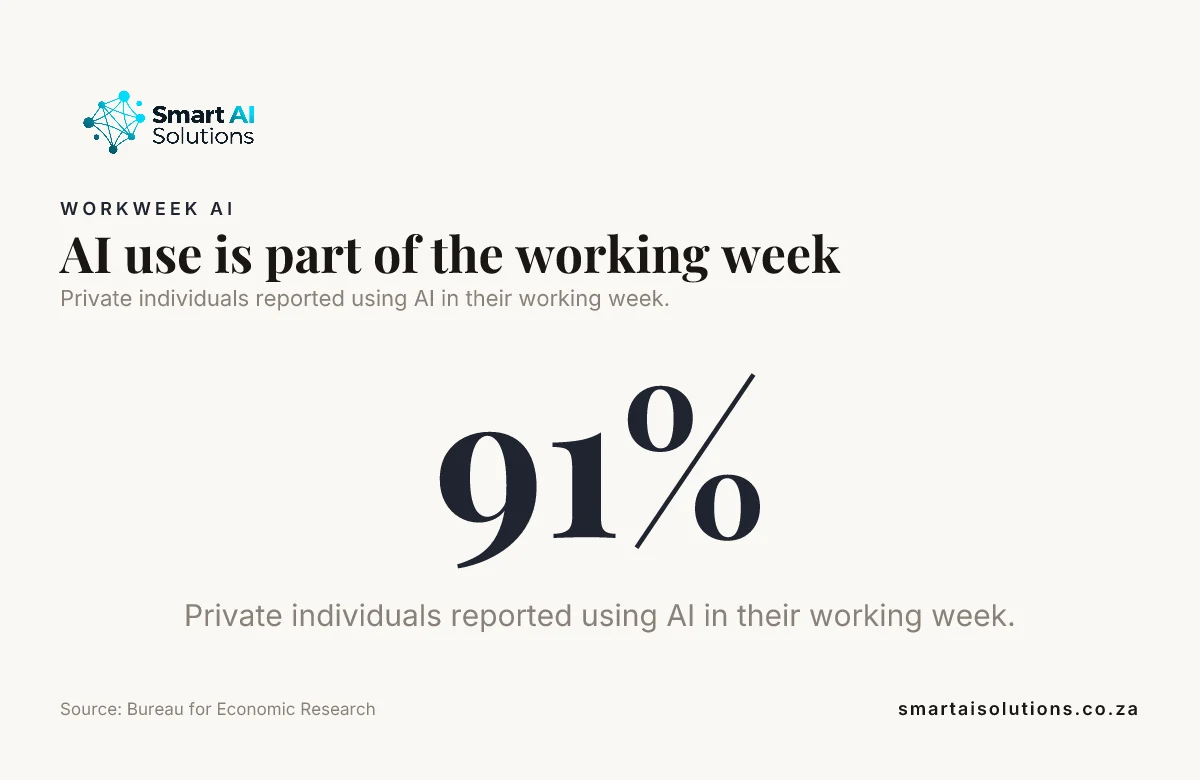
Did you know? In the Bureau for Economic Research's 2026Q1 outlook survey, 91 per cent of private individuals reported using AI in their working week. The survey covered 358 registered users of the BER website and is not nationally representative. Source: Bureau for Economic Research
Keep it working after launch
Somebody has to own the connection after go-live, or the time savings fade. Name the person who checks who has access and what the audit log shows, especially when staff change roles or a workflow changes.
- When a connection stops working, the workflow should report the failure and leave the original content untouched, and staff should have a manual fallback for essential work.
- Train people to check AI-generated summaries and proposed updates against the source, and give them an easy way to report a wrong result.
- When you add users or tasks, review permissions again and remove access that is no longer needed.
For ongoing care, our managed workflow automation covers process mapping, tool integrations, documentation, handover and monitoring.
Did you know? In the same BER survey, 41 per cent of managers and 30 per cent of private individuals reported using AI for more than five hours a week. Like the figure above, it describes BER website users rather than all South Africans. Source: Bureau for Economic Research
How to choose the integration service
You want a service that gets your existing tools talking, without handing your team a new one to learn. Ask each provider:
- Which connectors and actions will you use for our CRM, Microsoft 365 and Google Workspace, and have you confirmed each one on our editions?
- Will you build on an integration platform, custom code or both, and who pays for and owns those accounts?
- How will you map fields, handle duplicates and decide which system owns each value?
- What needs a person's approval, and how is every change recorded?
- What happens when a connector fails or an API changes, and who gets the alert?
- How do we undo a wrong update, and who maintains the workflow after launch?
If the immediate need is a sales workflow, compare a CRM-focused approach with a broader integration scope. If several business applications must exchange data, ask for a scoped plan that shows how the data stays in sync and what happens to a record that fails validation.
How we set it up with you
We do the setup and stay with you, so your team keeps working in Outlook, Gmail and the CRM it already knows. The worry most owners don't say out loud is that an automated update will put a wrong detail on a customer's record or send a message nobody checked. So the rollout moves in three stages, and you set the pace:
- Everything is drafted and you approve it. Proposed CRM updates, notes and follow-ups wait for a person, and nothing reaches your customers without your approval.
- Routine updates run on their own while you stay informed. Once the pilot shows enquiries and meetings land on the right records, the everyday updates flow, and you see what changed and what went to review.
- Hands-off, only when you choose. Some teams never move to this stage, and that is fine.
Setup is done for you: we map the workflow with your team, confirm each connector and action, build and test on controlled data, and document who owns what. You see a first real result within 48 hours of go-live, and a named person checks in during the first weeks and answers quickly.
AI Integration Services start from R35,000 per project. CRM and sales automation starts from R15,000 once-off setup, and the CRM Lite package adds an R2,999 per month SLA. See the pricing overview for the rest.
Frequently asked questions
Questions that come up when a business wants its CRM connected to both suites.
Can a connector work with a custom-built CRM?
Yes, when the CRM exposes suitable API endpoints and supports an authentication method the integration can use. Test its endpoints, field structure and write behaviour before it handles live records.
Can the integration read email attachments as well as the message?
Yes, if the connector can retrieve the attachment and the workflow includes a parser for that file type. Set allowed formats, size limits and what happens to unreadable or password-protected files.
Can it work with a shared Microsoft 365 or Google Workspace mailbox?
Yes, if the connector and its sign-in method support shared mailbox access. Tie the connection to an accountable identity, and keep messages processed for the mailbox separate from actions taken by an individual.
Can we keep Microsoft 365 and Google Workspace accounts separate while connecting both to one workflow?
Yes. The integration uses a separate authorised connection for each suite and passes only the required data between them, while each account keeps its own identity and access controls.
What happens to connector access when an employee changes roles or leaves?
Remove or update their access through your identity and application controls, then review any workflows they owned. Reassign ownership and credentials so no workflow depends on a former employee's account.
What should we do if a workflow keeps failing after launch?
Pause the affected action, keep the error details and send the case to the named workflow owner. Check whether permissions, an API or a field changed, then test the fix before automatic updates resume.
Conclusion
Aim for this: nobody copies emails, meetings or files into the CRM by hand, and customer records stay complete without anyone chasing them. So what AI integration service can connect Microsoft 365, Google Workspace and our CRM? Choose a partner that audits the systems you already use, confirms the exact connector actions, maps CRM fields and access rules, then pilots the workflow with a clear way back.
Do not buy a generic compatibility claim. Map the work and confirm the permissions. Test the hand-off. Expand only when the integration follows your business rules and your staff can see what it changed.
Start with one problem: enquiry emails landing on the right CRM record without anyone retyping them, through our AI Integration Services. Once that runs reliably, add meeting logging and follow-up tasks through CRM and sales automation. If you are unsure where to begin, an AI readiness assessment sets the priorities. To talk it through, contact us.