
The short answerYes. Your team can ask one assistant for answers from the mail and documents they already keep in both suites, without hunting through two systems, and nobody sees a file they are not already allowed to open. That holds when each person's accounts are matched in both systems, access is checked every time content is fetched, and you test it with real staff accounts before everyone gets it.
The short answer
Yes. Your team can ask one assistant for answers from the mail and documents they already keep in both suites, without hunting through two systems, and nobody sees a file they are not already allowed to open. That holds when each person's accounts are matched in both systems, access is checked every time content is fetched, and you test it with real staff accounts before everyone gets it.
Can a business AI assistant work with both Microsoft 365 and Google Workspace while respecting user permissions? Yes. Your team can ask one assistant for answers from the mail, documents and meeting notes they already keep in both suites, and nobody sees a file they are not already allowed to open, as long as each person's accounts are matched in both systems and access is checked every time content is fetched.
That means less time hunting through two inboxes and two drives for the latest version of a document, and fewer awkward moments when someone sees a payroll sheet or a client file that was never meant for them. A connection on its own doesn't make this safe. The setup has to know who each person is in each system, what they can open there, and what happens to old answers after their access changes.
Disclosure: Smart AI Solutions wrote this guide and sells the assistant, integration and readiness services linked in it. No other supplier is ranked here.
Key takeaways
Owners usually ask the same six questions before they let staff search company files through an assistant.
| Question | Practical answer |
|---|---|
| Can a business use both suites? | Yes. An assistant can connect to Microsoft 365 and Google Workspace through native connectors or an integration layer. |
| Does a connection guarantee permission-aware answers? | No. Each person's identity and the source system's permissions must be enforced when content is fetched, and again in generated answers and anything cached or shared from them. |
| Does searching mean the assistant can take action? | No. Reading and summarising content are separate from editing documents, sending email or scheduling meetings. |
| Which assistant is best? | There is no universal winner. Compare Microsoft 365 Copilot, Gemini for Google Workspace and third-party options against your real workflows and access rules. |
| Should a business switch suites for AI? | Compare the whole workflow and the migration effort first. A move made just for one feature can interrupt work that already runs well. |
| Where can we start planning? | Our practical guide to AI as a Service and custom automation shows how to assess the systems you have before building new workflows. |
Using both suites is possible, but connecting is not the same as working across both
Your team can keep working in the tools they know and still ask one assistant for answers. A business can use Google Workspace and Microsoft 365 together. An assistant can connect to both through native integrations or a separate integration layer, depending on the product and how you configure it.
Finding information in both suites is different from carrying out tasks in both. An assistant that can fetch and summarise a document does not automatically have permission to edit that file, send a message or book a meeting in the other platform.
Microsoft 365 Copilot and Gemini for Google Workspace are suite-specific options. Microsoft has also renamed Microsoft 365 Copilot to Microsoft Copilot, with some licences still using the old name during the transition, so expect both names in quotes and admin screens. Assess each assistant against the work people actually do in its own suite. Evaluate any third-party assistant separately for the connectors, content types and actions it supports. For the broader picture of what an assistant can do for each employee, see our earlier guide to AI copilots for every employee.
The Google Workspace vs Microsoft 365 question matters less than the work itself. Compare options against the email, documents, spreadsheets and meetings your team already relies on, and factor in migration effort. Switching suites only to get one assistant feature can disrupt established work. Connecting an assistant to both keeps familiar tools in place, provided access is designed correctly.
Map identities and permissions in both systems before connecting content
Nobody should be able to see a file through the assistant that they could not open themselves. To get there, the assistant needs a reliable way to identify the person behind each request in both Microsoft 365 and Google Workspace. Map each person's accounts explicitly, using authoritative identity records, instead of treating matching email addresses as proof of identical access.
Decide what happens when an employee has an account in only one suite, or when their group memberships and sharing rights differ between the two. If the assistant cannot confirm which identity and permissions apply, it should refuse rather than assume the person is entitled to the content.
Keep each source system's access boundary in force. A broad service account that can read every file is a serious exposure risk if the assistant relies only on its chat screen to hide restricted material.
Review the permissions already attached to business content before you switch on enterprise search through the assistant. Inherited access, stale accounts, public links and overly broad groups can already expose files directly. Permission-aware retrieval cannot repair unsafe sharing in the underlying system. Our guide to preparing business data before AI integration covers that clean-up in more depth.
- Map users: keep a clear link between each employee's identity in both suites.
- Resolve differences: define how the assistant handles missing accounts and conflicting access rules.
- Preserve source controls: require access to be checked against the original system, not only in the assistant's interface.
- Clean up sharing: remove unnecessary access before indexing business content.
Permission-aware answers need protection beyond search results
A summary can give away a confidential detail just as easily as the file it came from. Permission-aware retrieval must check the requesting person's authorisation when it fetches content. An index built with a privileged account must not let every user benefit from that account's wider access.
Both suite vendors describe this boundary for their own assistants. Microsoft's documentation says Microsoft Copilot only surfaces organisational data to which individual users have at least view permissions, and Google's privacy hub for generative AI in Google Workspace says Gemini follows your organisation's existing controls and data handling practices. Those promises cover each suite on its own. Once one assistant spans both, the same rule has to hold across the join.
The checks must cover the original files and the material created from them. Snippets, summaries, generated answers, cached content, conversation history, exports and shared links can all reveal information, so each needs controls that reflect who is allowed to see it.
For example, a summary created for one employee should not become source material for another employee unless that person may open the underlying content. Set rules for how cached answers respond to permission changes, and decide how quickly a revoked permission must stop influencing new answers.
Then test that timing. A permission change in a source suite does not prove that an index, cache or existing conversation has updated in the same way.
Test this: if an employee loses access to a source file, can they still get its key details through a summary, an earlier conversation or an exported answer? If so, the access boundary does not yet cover the full life of an answer.
Match connectors to the work people actually do
The assistant should take repetitive work off people's plates in the apps where that work already happens. List what employees need help with across email, documents, spreadsheets and meetings. Then test each task in the app where it happens, because support for one content type does not prove support for every app or action.
| Work area | What to test | Permission distinction |
|---|---|---|
| Find a message, summarise a thread, draft a reply, and test any sending workflow. | Reading a message and sending email are separate permissions. | |
| Documents | Search for a file, summarise it, draft content, and test edits. | Fetching a file does not authorise changes to the original. |
| Spreadsheets | Ask questions about a sheet, check the figures used, and test any requested update. | Viewing data and writing to a workbook should be controlled separately. |
| Meetings | Check access to meeting material and summaries, then test any calendar workflow. | Access to a document does not imply authority to change a meeting. |
Separate read, summarise, draft and write permissions in the design, then grant only the actions each workflow needs. Copilot permissions and Google Workspace AI settings may suit work that stays inside one platform. A third-party integration layer may be needed to coordinate a process that crosses both suites.
When off-the-shelf connectors do not cover a workflow you need, our AI Integration Services team looks at your existing systems and can build custom middleware to connect them. That suits businesses that need a connection built around one specific cross-platform process.
Plan for connector failures and exceptions as well as normal operation. Set up data checks so a workflow flags incomplete or stale information instead of quietly passing it along as current.
Did you know? Feedback data from Gemini in Google Workspace may be retained for up to 18 months. Source: Google Workspace Help
Set licensing, privacy and retention rules before rollout
Settle who pays for what, and how long conversations are kept, before anyone relies on the assistant. Check which capabilities your current plans include and which need separate licences. Compare the cost of the complete workflow, including add-ons and integration work, rather than judging an option by the headline price of one assistant feature.
Access to Gemini depends on the Workspace plan and licence each account holds, so capabilities vary with each account's entitlements. The same applies when you compare suite-specific features on the Microsoft side: confirm the entitlements of the accounts that will actually use them.
Assess business-account data terms separately from consumer AI terms. For each product and plan, review how prompts, fetched files, user feedback and conversation logs are handled, including whether business content is used to train models. Microsoft says prompts, responses and data accessed through Microsoft Graph aren't used to train foundation LLMs, and Google says Workspace does not use customer data for training models without the customer's prior permission or instruction. In South Africa, those terms sit alongside your own POPIA duties, which our guide to AI security and data privacy for South African businesses walks through.
Set retention and deletion rules for prompts, answers, indexes and audit records before broad use. Google Workspace Help says admins can choose to automatically delete Gemini conversations after 3, 18 or 36 months.
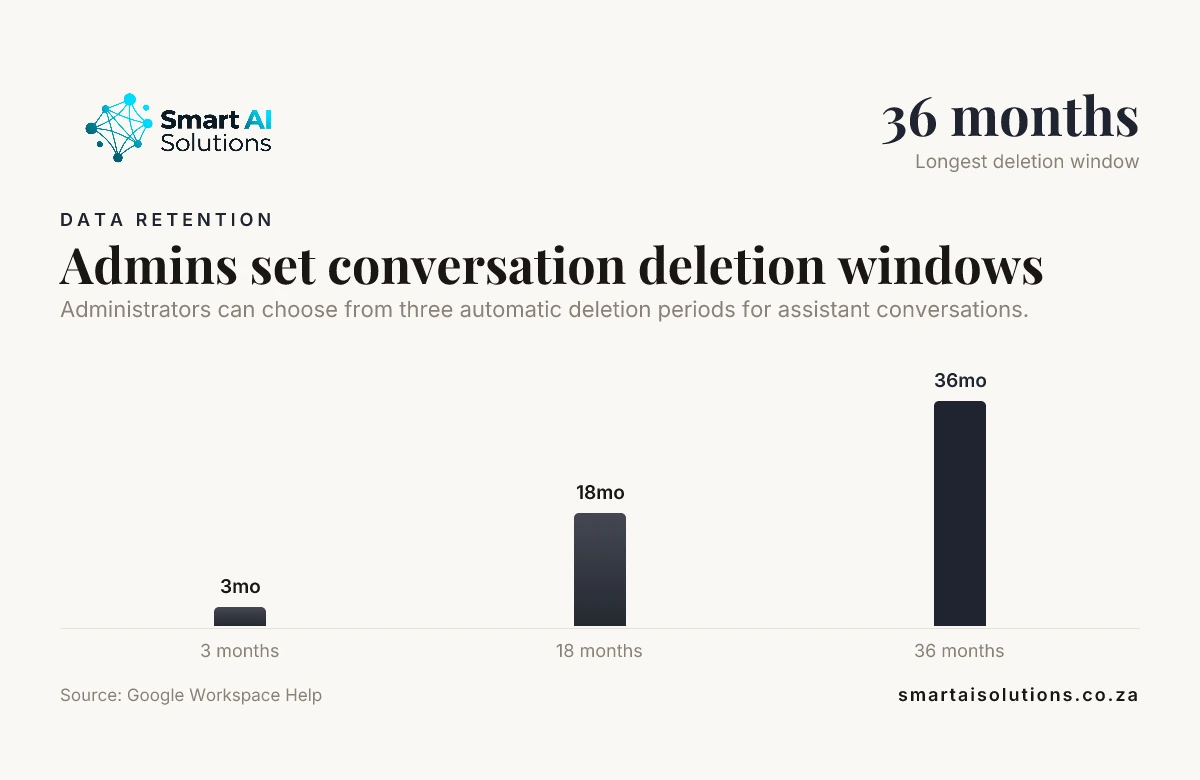
Admins can choose to automatically delete Gemini conversations after 3, 18 or 36 months. Source: Google Workspace Help
For a consulting firm organising an archive, our AI-Powered Consulting Knowledge Hub is a searchable knowledge system built on the firm's document archive, with document ingestion, conversational retrieval, continuous knowledge capture and configurable access permissions. It is a useful starting point for deciding how searchable knowledge and access rules should fit together.
Name an owner for access reviews, activity auditing, retention decisions and incident response across the teams that run both suites. If you are shaping a first governance plan, our AI Readiness Assessment and Roadmap reviews data and tooling needs before you set priorities.
Pilot with real access boundaries before expanding
A short pilot with real staff accounts proves the assistant keeps confidential files private before everyone depends on it. Choose pilot accounts with different roles, group memberships and sharing situations. For each account, check that the assistant only returns content the person is entitled to see in each suite.
Include inherited and group-based permissions, restricted files, removed access and mismatches between a person's identities across platforms. Recheck later answers after access is revoked, to see whether the assistant still surfaces protected information.
Review activity records to understand who asked a question and which sources informed the answer. Give the right administrators visibility into those events while limiting exposure of the content itself; usage reporting and source-level audit detail serve different purposes.
Train employees to check the sources behind an answer, keep sensitive material out of unapproved tools, and report any answer that seems to reveal restricted information. Expand only after the pilot shows that access checks, logging, escalation and incident procedures work in practice.
How we set it up with you
We set the assistant up for you and stay with you, so your team gets answers faster without your files ending up in front of the wrong person. The worry most owners don't say out loud is that the assistant will show a salary sheet to the wrong employee, or send a half-finished email to a client. It's a fair worry. So the rollout moves in three stages, and you control the pace:
- Everything is drafted and you approve it. The assistant finds, summarises and drafts, and nothing is sent, edited or booked until a person approves it. Nothing reaches your customers without your approval.
- Routine tasks run on their own while you stay informed. Once the pilot has shown that access checks hold, low-risk tasks such as filing a summary or answering an internal policy question can run without a click, and you see what ran.
- Hands-off, only when you choose. Some teams never move to this stage, and that is fine.
Setup is done for you: we map the accounts in both suites, connect the sources, run the access tests above with your real staff accounts and hand over a short record of what was tested. You see a first real result within 48 hours of go-live, and a named person checks in during the first weeks and answers quickly. Custom assistants through our AI Chatbots & Assistants service start from R15,000 once-off setup, and the scope is set after we have looked at how your two suites are shared.
Frequently asked questions
These are the questions staff and managers raise most often once a pilot starts.
Can employees use one sign-in for both suites and the AI assistant?
They can, if the organisation configures federated sign-on and the assistant supports it. The assistant still needs to connect each suite under the correct user identity, so one login does not collapse separate access rules.
What should happen if an employee loses access while an answer is being generated?
The assistant should recheck authorisation before delivering content that depends on the source, and stop or remove any part the user may no longer see. Define this behaviour in the product configuration and include it in access testing.
Can an assistant safely use files shared with external guests?
Only when the connector honours the source file's guest-sharing rules and the business permits that use. A guest's access should not give an internal employee, or another guest, broader rights through the assistant.
How should a business handle AI conversation logs when an employee leaves?
Remove the former employee's account access and handle their conversation records under the organisation's retention and legal-hold rules. If a team needs a record for continuity, transfer it through an approved administrative process rather than leaving the former employee's account active.
Can an AI assistant send email or change a calendar event?
Only when the connected workflow includes those actions and the user's permissions allow them. A business can also require a person to confirm before the assistant sends or changes anything.
What happens if a connected file is moved or renamed?
The connector should find the file's current location and keep the answer tied to a source the user can open, rather than relying on a stale index entry. Include moved, renamed and deleted files in connector testing so users can tell current records from outdated references.
Can my company track my Copilot usage?
Yes, workplace administrators may be able to view usage and audit activity, depending on the service configuration and their own access. How much of your prompts and the assistant's replies they can see also depends on that configuration.
Conclusion
Can a business AI assistant work with both Microsoft 365 and Google Workspace while respecting user permissions? Yes. Your team gets answers from its own mail and documents without hunting through two systems, and each person still sees only what they could open before, provided you map identities across both suites, check authorisation when content is fetched, protect generated answers and test access changes with real accounts.
Choose connectors around the way your team already works, set licensing and data rules before rollout, and begin with a controlled pilot. Start with one problem: an assistant that answers one team's everyday questions from the documents and policies in the suite they use most, set up through our AI Chatbots & Assistants service. Once that is working, add the second suite and drafted email replies through our AI Integration Services. To talk through how your files are shared today, contact us.