The short answerAutomate one channel at a time, starting where most repeat questions arrive, with every channel answering from one approved source and logging into one shared inbox, so customers get a quick, correct answer wherever they write and your team stops answering the same question in three places.
The short answer
Automate one channel at a time, starting where most repeat questions arrive, with every channel answering from one approved source and logging into one shared inbox, so customers get a quick, correct answer wherever they write and your team stops answering the same question in three places.
What is the best way to automate customer service across web, WhatsApp and email? Do it in order, one channel at a time: start with the questions customers ask most, on the channel where most of them arrive, answer them from one approved source, and send every conversation into one shared inbox where a person can take over. Customers get a quick, correct answer wherever they write, and your team stops answering the same question three times in three inboxes.
The order matters more than the software. Most customer service automation that disappoints was switched on everywhere at once, before anyone agreed what the right answers were or who picks up when the bot cannot help. This guide sets out the sequence we follow with clients, in seven steps you can work through yourself.
Disclosure: Smart AI Solutions wrote this guide and sells the chatbot, WhatsApp and integration services linked in it.
A few neighbouring questions already have their own guides, so we won't repeat them here. How WhatsApp, email and web chat connect with shared context is covered in our multi-channel guide. One assistant answering on email and the website is covered in our email and website chatbot guide. Getting WhatsApp enquiries into a CRM for the sales team is in our WhatsApp CRM guide. This one is only about the order of the work.
Key takeaways
Seven steps, in this order, settle most of the work.
| Step | What to do | Why it comes here |
|---|---|---|
| 1. Count the questions | Tally a fortnight of customer questions by topic and by channel | You automate what customers actually ask |
| 2. Pick the first channel | Start on the channel that carries the most repeat questions | One channel is easier to test, fix and trust |
| 3. Approve one answer source | Write each answer once and have every channel read from it | Customers get the same answer on WhatsApp, web chat and email |
| 4. Use one shared inbox | Route every channel into one inbox and one customer record | Nobody answers the same customer twice, and nobody is missed |
| 5. Decide when a person takes over | Write the handover triggers before launch | No customer gets stuck with a bot |
| 6. Add the next channel | Reuse the approved answers and the inbox for the second and third channel | Each new channel takes less work than the first |
| 7. Measure the first month | Track confirmed answers, repeat contacts and handovers | You see whether customers were actually helped |
Step 1: Count what customers ask, and where
Start by finding out which questions repeat and which channel they arrive on. Take the last two weeks of WhatsApp chats, website enquiries and support emails, and sort every message into a topic: order or job status, prices, opening hours, bookings, returns, account access, complaints.
Mark each topic with the channel it came in on. You will usually find that a handful of topics make up most of the volume, and that one channel carries more of them than the others.
Then mark which topics have a clear, rule-based answer and which need judgement, empathy or a decision only a person can make. Order status, opening hours and "where do I send my documents?" are good first candidates. A billing dispute with an unhappy long-standing customer isn't.
Before you change anything, write down a starting point: how long customers wait for a first reply on each channel, how often the same customer writes again about the same thing, and how many messages go unanswered after hours. Skip this and in a month you won't be able to tell whether the change helped.
Step 2: Pick the first channel by its repeat questions
Automate the channel where the most repeat questions land first, not the one that sounds most modern. For many South African businesses that is WhatsApp, because customers already message you there and expect a reply on their phone. For others it is the website, where visitors look for answers before they buy, or a shared support mailbox that fills up overnight.
Each channel behaves differently, which affects how you start:
| Channel | Why it can go first | What to plan for |
|---|---|---|
| Customers already use it, and short questions suit quick answers | Free-form replies are only allowed inside the 24-hour customer service window that opens when the customer messages you; after that, only pre-approved templates can be sent (Meta developer documentation) | |
| Website chat | Visitors are already on the page, so it is easy to test with real traffic | Keep it light and mobile-friendly, and keep a visible way to reach a person |
| Customers expect a slower reply, so drafted answers can be checked before sending | Messages are longer, mix several questions and carry attachments |
Start with one or two of the most common topics on that channel, not the whole list. A narrow first release is quicker to check, and it shows the team what good looks like before you widen it. Our WhatsApp Business Automation service is the usual starting point when WhatsApp customer service carries most of the repeat questions.
Step 3: Approve one answer source for every channel
Write each answer once, approve it, and let every channel read from that same source. If the website chat, the WhatsApp assistant and the email drafts each keep their own copy of your prices, hours and policies, they will drift apart, and customers will notice.
- Give the content a named owner. One person approves new answers and changes, and reviews the questions the assistant could not answer.
- Write for the channel. The same approved fact can be a two-line WhatsApp reply and a fuller email paragraph, but the fact itself stays the same.
- Use plain language and end with a next step: tell the customer what to do, where to click or who will contact them.
- Offer the languages your customers use, and have fluent reviewers check the wording before it goes live.
- Remove old and conflicting content. An out-of-date price list does more harm once a bot is quoting it than it ever did sitting in a folder.
How to keep a chatbot inside approved company information is covered in detail in our guide to consistent answers from approved information. For the order of work, that means one thing: build the answer source before the second channel, so the second channel can reuse it.
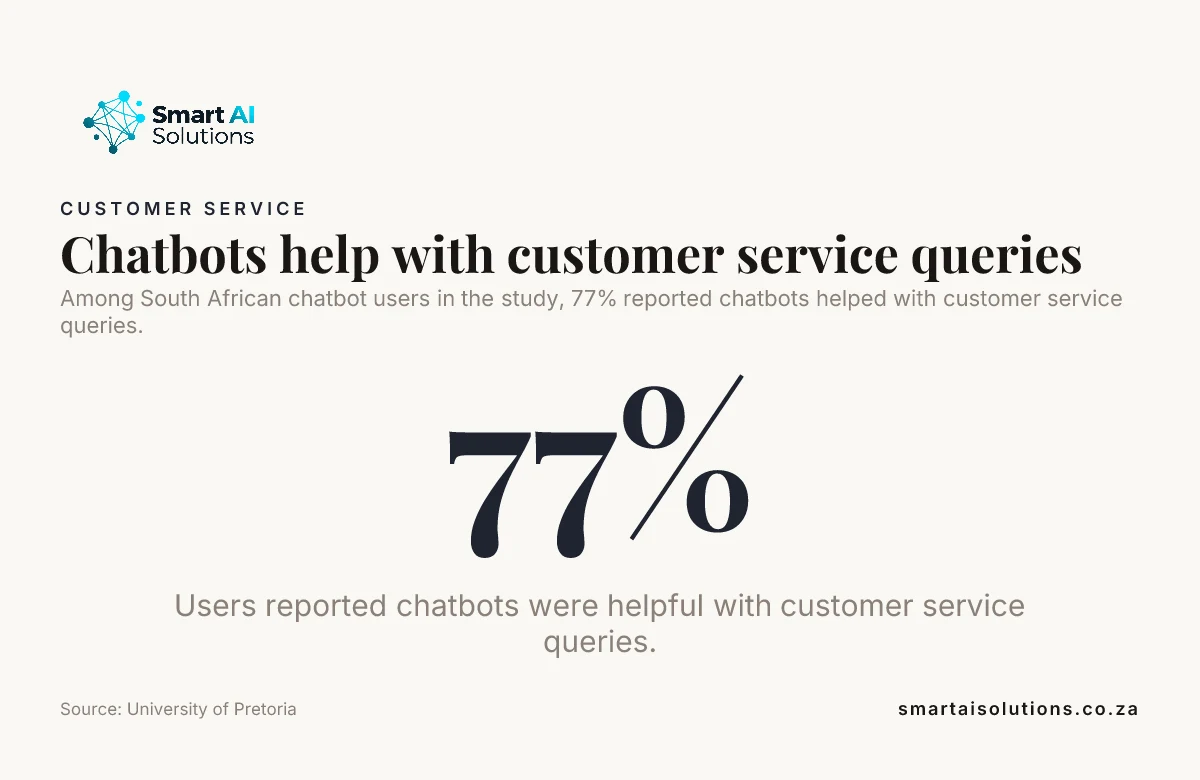
Did you know? In a 2025 University of Pretoria study of South African chatbot users, 77% said chatbots were helpful with their customer service queries and 58% said they experienced improved customer service through chatbots. The same study found the gaps were in complex queries. Source: University of Pretoria (Boikanyo, 2025)
Step 4: Send every channel into one shared inbox
Route every channel into one shared inbox, so the team sees one conversation per customer instead of three. When a customer asks on WhatsApp, follows up by email and then opens the website chat, the person who picks it up should see all three messages and what the assistant has already said.
- Create a ticket or case when the assistant cannot resolve a question, with the customer's question and the conversation so far attached, so nobody asks the customer to repeat themselves.
- Classify and route it by topic and urgency, so an urgent fault does not wait behind a routine question. Test the categories on real past messages, including vague and mixed ones. Our support ticket triage page shows how tickets are classified by issue type and severity and routed to the right queue.
- Link it to the customer record in your CRM or order system, so the assistant and the team work from the same history. For online stores, our customer support assistant for e-commerce connects to WooCommerce or Shopify to answer order questions, process returns and check stock.
- Limit what each workflow can see to the customer information it needs, and protect it in transit and at rest. Our POPIA guide for chatbots covers consent and data handling.
If your inbox, CRM and order system do not talk to each other yet, AI Integration Services investigates the systems you have and connects them in a planned way, so the shared inbox is not another separate list.
Step 5: Decide when a person takes over
Write down when a person takes over before launch, so no customer gets stuck with a bot. Most customers are happy with a quick automated answer to a simple question. When the problem is complicated, most still want a person.
Did you know? The same University of Pretoria study found that only 22% of South African chatbot users prefer chatbots over live human agents, and it highlights a preference for human agents for complex tasks and scenarios. Plan the handover before you plan the automation. Source: University of Pretoria (Boikanyo, 2025)
Set clear triggers for a handover:
- The customer asks for a person. Never make them go through repeated bot prompts first.
- The assistant is not confident in its answer, or the customer has rephrased the same question twice.
- The topic is sensitive: a complaint, a billing dispute, a cancellation, anything involving health, money owed or legal matters.
- A connected system is down, so the assistant cannot look up the order or booking.
When the conversation moves to a person, pass on a short summary, the details the customer already gave and what the assistant already tried. Outside staffed hours, the assistant should say honestly when a person will reply and point urgent matters to the right contact, rather than suggest someone is online. Whether a live person, a bot or a mix suits your business is weighed up in our chatbot vs live chat comparison. Handover between separate support teams is a topic for a later guide.
Step 6: Add the second and third channels
Add the next channel only when the first one answers correctly and hands over cleanly. And by then you have an approved answer source, a shared inbox and handover rules, so the second channel reuses all three instead of starting from scratch.
- Reuse the approved answers. Adjust the length and tone for the channel, not the facts.
- Keep the conversation history across channels, so a customer who switches from WhatsApp to email does not start over.
- Use draft-and-approve for customer service email at first. Email replies are longer and often answer several questions at once, so the team checks the drafts before they go out until they are consistently right.
- Test the hand-offs between channels, such as a website visitor who asks to continue on WhatsApp, before customers find the gaps.
The detail of running one assistant on email and the website together is in our email and website chatbot guide.
Step 7: Measure what matters in the first month
In the first month, measure whether customers got a correct answer, not how busy the bot was. A high number of automated conversations can hide customers who gave up and phoned instead.
| Week | What to do | What to look at |
|---|---|---|
| Week 1 | Read every automated conversation on the first channel | Wrong or unclear answers, missed handovers |
| Week 2 | Fix the answer source and the handover triggers | Questions the assistant could not answer |
| Week 3 | Compare against your Step 1 starting point | Time to first reply, repeat contacts on the same issue |
| Week 4 | Decide whether to widen the topics or add the next channel | Confirmed resolution and customer feedback |
Track these measures by channel:
- Confirmed resolution: the customer's question was answered or the task was done, checked against the record, not assumed because the chat ended.
- Repeat contacts: the same customer writing again about the same thing within a few days, on any channel.
- Time to first reply and time to resolution, compared with your baseline.
- Handovers: how many conversations moved to a person, and why.
- Customer feedback: a short rating or comment after the conversation. Make sure an acknowledgement never suggests that an open issue is resolved.
Review failed and unsatisfactory conversations on a fixed day each week, change the answer, rule or trigger that caused the problem, and test the change before you rely on it.
How we set it up with you
We do the setup and stay with you, so your team keeps the WhatsApp number, mailbox and website it already has. The worry we hear most is that an automated reply will say something wrong to a good customer. So the rollout moves in three stages, and you set the pace:
- Everything is drafted and you approve it. At first, replies are drafted for your team to check, and nothing reaches your customers without your approval.
- Routine questions run on their own while you stay informed. Once the answers have been right for a few weeks, routine questions such as order status and opening hours are answered automatically, and you see a summary of what was sent and what was handed over.
- Hands-off, only when you choose. Some businesses keep approval on certain topics for good. That's fine.
Setup is done for you: we count the questions, write and load the approved answers with your team, connect the channel to your inbox and records, and set the handover rules. You see a first real result within 48 hours of go-live, and a named person checks in during the first weeks and answers quickly.
AI Chatbots & Assistants start from R15,000 once-off setup. WhatsApp Business Automation starts from R8,000 per month, and process automation for workflows such as ticket routing starts from R30,000 per workflow. When support spans several workflows and system connections, the Growth Partner retainer gives you a dedicated developer for 40 hours a week at R35,000 per month, and the Enterprise Partner plan is priced to the operation. See the pricing overview for the rest.
Frequently asked questions
Questions owners ask when they plan customer service automation across channels.
Should customers be told when they are chatting with an automated assistant?
Yes. Say at the start that the customer is talking to an automated assistant and what it can help with, so they can choose how to proceed. Make it easy to ask for a person at any point.
How can automated customer service work for people with disabilities?
Support keyboard navigation, visible focus states, screen-reader labels and readable text contrast in the website chat. Offer another way to make contact that does not depend on finishing a chat.
Can customer service automation work for a small team?
Yes. A small team can automate a narrow set of repeat questions on one channel and keep more time for customers who need personal attention. Content ownership and the weekly review can be part of existing support duties.
What should customers get when they write outside office hours?
An honest acknowledgement, useful answers for routine questions and a clear statement of when a person will reply. Urgent requests should be pointed to the right urgent contact, never told that someone is available when nobody is.
Does customer service automation replace a CRM?
No. A CRM stores and organises customer records. Automation carries out defined service steps using information from the CRM and other connected systems. The two work together.
Can customer service automation work without generative AI?
Yes. Rule-based workflows handle predictable tasks, such as sending a status update after an order ships. Language models help interpret less structured questions, while rules still govern the steps that follow.
Conclusion
The aim is simple: customers get a quick, correct answer on whichever channel they use, and your team stops answering the same question three times in three inboxes. So what is the best way to automate customer service across web, WhatsApp and email? Count the questions, start on the busiest channel, answer from one approved source, route everything into one shared inbox with clear handover rules, then add the next channel. Measure confirmed answers, not activity.
Start with one problem: the repeat questions on the channel where most of them arrive, which for many businesses is WhatsApp Business Automation. Once those answers are trusted, add website chat through AI Chatbots & Assistants, using the same answers and the same inbox. If you are not sure which comes first for your business, an AI readiness assessment sets the order.