
The short answerChoose one assistant that answers in your website chat and replies to your support inbox from the same approved information, keeps one history per customer and hands anything tricky to a person. No customer email sits unanswered overnight, and the answer is the same whichever way they ask.
The short answer
Choose one assistant that answers in your website chat and replies to your support inbox from the same approved information, keeps one history per customer and hands anything tricky to a person. No customer email sits unanswered overnight, and the answer is the same whichever way they ask.
Find a multi-channel chatbot that can handle customer questions through email as well as our website, and no customer email sits unanswered overnight. Look for one AI email assistant that also answers in your website chat, drawing on the same approved information, so a customer gets the same answer whichever way they ask.
The test is simple to state and easy to fudge in a demo. The assistant must write real replies on both channels. Collecting email addresses or sorting messages into folders doesn't count. It should keep one conversation history per customer, and it should hand anything it cannot answer to a person with the full story attached.
Disclosure: Smart AI Solutions wrote this guide and sells the chatbot and integration services linked in it. No other provider is ranked here.
Key takeaways
Six questions tell you whether a chatbot will really cover your website and your inbox.
| Question | What to look for |
|---|---|
| Can it reply to support emails? | Ask to see a new email answered. A shared inbox or an email capture form does not prove the assistant replies to email. |
| Does the website chat use the same answers? | Both channels should read from one approved knowledge source, so an update reaches both at once. |
| What happens when a customer switches channels? | The person who picks up the case should see the earlier chat, the customer's details and the open issue in one place. |
| What does it do when it is unsure? | It says so, does not guess, and offers a clear route to a person. |
| How do we assess a chatbot we already run? | Test everyday questions, edge cases and escalations. Our chatbot audit reviews real-conversation handling, escalation and compliance. |
| How do we know it is working? | Track resolution, escalation, repeat contacts and response time separately for website chat and email. |
Check that it answers email, not just collects it
A customer who emails after hours should wake up to a reply, not a ticket number. That only happens if the assistant can read a new support email and draft or send a proper answer, so ask the vendor to show a question in the website widget and a fresh incoming email side by side. Plenty of multi-channel demos never open an inbox.
An auto reply email that only says "we got your message" is an automated email response, not an answer. Keep three jobs apart when you compare tools. A chatbot writes answers. A shared inbox organises conversations. A helpdesk turns requests into tickets. Some platforms do all three, but test each one in the workflow your team will actually use.
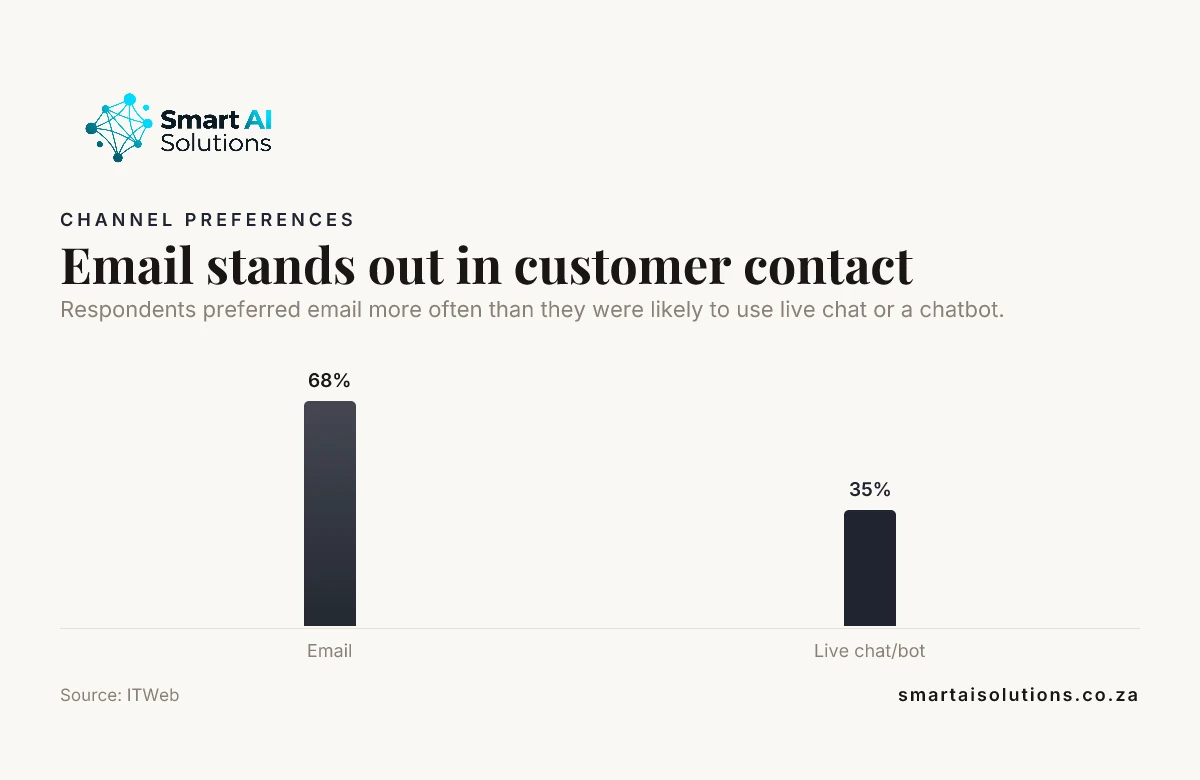
Email deserves its own row in your comparison. In a consumer survey of 2,000 South Africans by the BPO provider Merchants, 68% of respondents said they prefer email when contacting a business or service provider, and 35% said they would use live chat or chatbots, ITWeb reported in 2020. A website chat widget on its own misses the channel many of your customers already reach for.
If you also want answers on WhatsApp, Facebook Messenger and SMS later, check now that the same assistant can grow into an omnichannel chatbot without starting again. Our earlier guide to connecting WhatsApp, email and web chat covers the wider architecture; this one stays on the website-plus-email pair most teams start with.
Keep one conversation history across website and email
Your customer should never have to explain the problem twice. Ask whether a website chat and a later email from the same person land in one workspace, and how the system knows they are the same customer. Putting messages side by side in a shared inbox is one thing; matching them to a customer record is another, and you need both.
Check what follows the customer between channels: earlier messages, contact details and anything still unresolved. When the assistant escalates, the person taking over should receive that history with the handover, not a bare alert that leaves the customer to start again.
Matching is where the history usually splits. Test three paths in the demo: a known customer, an anonymous website visitor who later emails, and a customer who writes from a new address. Ask how each case appears to your team and how someone corrects a wrong match.
Email threading matters too. A reply to an older message should stay attached to the right conversation instead of opening a duplicate that hides the customer's latest issue.
This is where many teams struggle. In the 2022 State of CX in South Africa survey by ITWeb and Freshworks, 47% of respondents named channels that are not integrated and customer data siloed across teams as the main obstacles to a single view of the customer, ITWeb reported.
Use one approved knowledge source for both channels
The same question should get the same answer on Tuesday's chat and Thursday's email. Ask whether website and email replies draw on one approved knowledge base, and whether a change you make reaches both channels at once. If each channel uses its own articles or an older policy version, customers will get conflicting answers and your team will spend the week apologising.
Test the email side with a long message that asks several things. A good assistant answers each supported question clearly, separates the distinct requests, and asks one focused follow-up when the meaning is unclear instead of filling the gap with a guess.
Set a clear boundary for what it may answer:
- Knowledge: list the FAQs, policies, product information and internal guidance it may use.
- Control: decide which answer types can go out on their own and which need a person to approve them.
- Traceability: make sure your team can see which question and which source shaped each reply.
Customer emails often carry personal details, so settle how long conversations are kept and who can see them before launch. Our guide to POPIA compliance for AI chatbots covers the South African rules.
Make the handover to a person clean
A customer who needs a person should reach one quickly, with nothing lost on the way. Set the triggers before launch: the assistant failing to answer twice, a customer asking for a person, or a request that needs judgement beyond its approved information. Complaints and sensitive requests belong on that list too.
Route each escalation to the right queue as well. A billing question and a service complaint usually need different people, so test both and check that each lands with the team that can act on it.
When someone on your team takes over, they should get the customer's question, the assistant's replies and the relevant history. Check the customer-facing message too. It should say clearly that a person will follow up, and never suggest an open issue is already fixed.
Did you know? According to McKinsey, 73% of customers want anywhere, anytime support, using multiple channels to engage with their favourite brands. Source: ITWeb
If you are weighing up when a bot should answer and when a person should, our comparison of an AI chatbot and live chat sets out the trade-offs.
Roll it out in three stages
Nobody wants a bot sending a wrong answer to their best customer. That worry is fair, and it is why we never switch email replies on all at once. We roll this out in three stages, so trust is earned before anything runs unattended:
- Everything is drafted and you approve it. The assistant drafts every email reply and suggests website answers, and a person approves them. Nothing reaches your customers without your approval.
- Routine questions run on their own. Once the drafts keep proving right, routine questions such as opening hours, order status and delivery areas are answered automatically while you stay informed, and anything unusual still comes to a person.
- Hands-off, only when you choose. More of the inbox runs unattended only when you decide the record justifies it.
We do the setup for you, and a named person checks in during the first weeks and answers quickly. You should see a first real result within 48 hours of go-live: real customer questions answered on the website and drafted in the inbox, waiting for your approval.
Match integrations to your support team
Your team should work in one place, not chase conversations across tabs. List the helpdesk software, CRM and messaging tools your people already use, then ask which connections pass customer records, conversation history and escalation details in both directions. An integration that only forwards a notification will not give anyone the context to resolve a case.
Small teams should put a simple shared workflow and a clean handover first. Larger or multi-team operations should also look at CRM integration, permissions, routing rules and whether the system can take on more departments as you grow.
Plan the people side as well. Decide who keeps the approved knowledge current, who configures the email and website flows, and which languages and regional requirements the assistant must meet.
For teams comparing options, our AI Chatbots & Assistants service in Cape Town CBD lists website, WhatsApp, email and social channels with handover to your team, and the Cape Town page covers website, WhatsApp, Facebook and email with complex queries escalated to people. Larger teams in Gauteng can compare the Johannesburg CBD page, which adds CRM integration. Online shops can look at the e-commerce support chatbot, which connects to WooCommerce or Shopify, order management, WhatsApp Business and website chat, and escalates complex issues. Connections to your existing software are scoped through our AI integration services.
Test both channels before launch
You only find the gaps before customers do if you test with real questions. Build the test set from your actual support traffic, because short, tidy FAQs flatter every bot. Include a simple website question, a multi-part email, an unclear request and a question the approved material does not answer.
Send the same supported question through the website chat and by email. Compare accuracy, tone and use of approved knowledge, and check that each reply suits its channel. A short chat answer and a structured email can share the same facts without the same formatting.
Include a case that should escalate. Confirm that the assistant does not invent an answer, tells the customer what happens next and gives your team enough context to carry on.
- Test common questions through both website chat and email.
- Review multi-part and unclear messages for complete, grounded replies.
- Check that unsupported questions and sensitive decisions follow the escalation path.
- Repeat the tests after any change to the knowledge, integrations or workflow rules.
Use your team's real terms and regional requirements in the test set. Retesting after changes catches differences between the channels before they reach a customer.
Measure each channel separately
A busy chat widget can hide an inbox that is quietly falling behind. Track resolution rate, escalation rate, repeat contacts and response time separately for website chat and email, so a strong result in one channel does not mask slow replies in the other.
Review a sample of automated answers for accuracy and unsupported claims, and group escalations by cause. Repeated gaps usually point to missing approved knowledge, unclear routing or a question type that should go straight to a person.
Use the questions that keep coming back unresolved to improve your knowledge articles or routing rules, then retest those scenarios. Include feedback from your team and customer follow-ups in each review. A high number of answers alone doesn't mean customers got what they needed.
What it costs
You can price this once you have seen it answer your own questions. Our chatbot builds start from R15,000 once-off setup, scoped to the channels and integrations you need; see pricing and our breakdown of what an AI chatbot costs in South Africa. If you already run a chatbot, the chatbot audit is a smaller first step.
When you compare quotes, look past the setup figure. Ask how many channels, user seats and AI usage each quote covers. Then check whether integrations, reporting or security controls are priced separately, because those shape the running cost as well as the fit.
Frequently asked questions
Can a chatbot handle attachments sent in support emails?
Only when its email workflow supports those file types and can read their contents safely. Route sensitive or unreadable files to a person, and keep attachments inside your organisation's approved handling process.
Does a chatbot need its own email address, or can it use our shared support mailbox?
It can work with a shared support mailbox when the integration and permissions let it read incoming messages and manage replies. A separate address can make routing and testing easier, while the shared address keeps the contact point your customers already know.
Can one chatbot support several brands or departments with different answers?
Yes, if the system keeps each brand's knowledge and tone apart, with its own routing and access rules. Make those boundaries explicit so a customer asking one department never receives another brand's policies.
What should a chatbot do when an email includes personal or payment information?
It should not repeat sensitive details in its reply, and it should route the message through your approved secure process. Limit access to the people and systems that need the information, and never ask customers to send card details by ordinary email.
Can an email chatbot send proactive messages as well as answer questions?
Some systems support outbound email, but that is a different job from answering customer questions. Set the purpose, audience and consent rules for any campaign separately from the support assistant's reply permissions.
How do we create a chatbot for customer service?
Define the questions it should handle, connect it to approved support information and the channels your customers use, and set the rules for handing over to a person. Then test common, unclear and unsupported questions before launch.
Can I add a chatbot to my website?
Yes. An AI chatbot for website enquiries is added through a chat widget and set up to answer questions from approved information, with a clear route to a person when needed.
What is the best chatbot for a website?
There is no single best choice for every website. Pick one that answers accurately from approved information, fits your support workflow and hands unresolved issues to a person.
Should customers be told when an AI is replying to their email?
It is good practice. A short line in the opening or the signature tells customers who is replying and how to reach a person if they prefer. Keep that wording the same in every automated reply.
How do we stop an email chatbot replying to spam or abusive messages?
Filter obvious spam before messages reach the assistant. For abusive or threatening emails, set a short, safe response and send the message to a staff member for review instead of letting the assistant carry on as normal.
Can an email chatbot send a file back to a customer?
Yes, if you approve the specific files and set up access to them. Use controlled links or checked attachments for sensitive documents, so one customer never receives another person's account information.
Conclusion
When you find a multi-channel chatbot that can handle customer questions through email as well as our website, no customer email waits overnight and the answer is the same whichever way they ask. Test both channels, check that one conversation history follows the customer, keep the assistant inside clear limits, and measure email and website chat on their own.
Start with one problem: the questions that pile up in your inbox overnight, answered from the same approved information as your website chat, through our AI Chatbots & Assistants service. Once those replies run reliably, add the next one: give customers the same answers on WhatsApp with WhatsApp Business automation. To talk through which questions to start with, contact us.