
The short answerWrite down the work each role needs help with, then choose the provider who asks the most about it: your workflows, your systems, who may see what and who supports the assistant after launch. Prove it with a pilot in one team, so each person gets help that fits their own job.
The short answer
Write down the work each role needs help with, then choose the provider who asks the most about it: your workflows, your systems, who may see what and who supports the assistant after launch. Prove it with a pilot in one team, so each person gets help that fits their own job.
How can I find a provider to build a custom AI assistant around our team's specific roles and processes? Write down the work each role needs help with first, then choose the provider who asks the most about that work: your workflows, your systems, who may see what, and who supports the assistant after launch. Each person gets help with their own job, instead of the whole team bending around a generic tool.
A focused brief and a small pilot with one team give you something real to judge. Then the decision to expand rests on evidence, not on a polished demo.
Disclosure: Smart AI Solutions wrote this guide and sells the services linked in it.
Key takeaways
Six decisions shape whether a custom AI assistant helps your people or gets ignored.
| What to decide | Why it matters |
|---|---|
| Which roles and tasks come first? | A clear role-based use case lets a provider scope different instructions, permissions and outputs for each role. |
| How will the provider learn the work? | Good discovery covers handoffs, exceptions, existing tools and the people doing the tasks. |
| What knowledge and systems will the assistant need? | Approved documents, working integrations and role-based access make it fit real processes. |
| What should happen when it is unsure? | Clear guardrails and a human handoff prevent unsupported answers and unapproved actions. |
| How will we decide whether a pilot passes? | Agree measurable criteria before testing, including answer quality, task completion and staff effort. |
| How ready is our team to begin? | Our free AI Readiness Assessment helps identify preparation needs and next steps. |
Start with the roles and tasks the assistant should support
The quickest relief comes from naming the people who will use the assistant and the jobs they repeat every week. Write each role down with its recurring tasks. The list shows where permissions, instructions, source material or answer formats need to differ between teams: a sales coordinator and a payroll clerk should not get the same answers from the same documents.
Next, map one or two painful workflows from the first request to the final outcome. Note the tools involved, each handoff, the common exceptions and where delays or rework happen. A provider can then scope the process you actually run, not a tidy version of it.
Set a baseline before development and define success in things you can observe, such as fewer repeated steps or tasks finished sooner. A broad request for a general-purpose assistant gives the provider little to build against and gives your team no clear way to judge results.

If you need help finding that first use case, our AI opportunity audit looks for repetitive tasks, data silos and communication bottlenecks, with attention to opportunities that pay back quickly. It suits teams that want to find and prioritise a starting point before choosing a platform or build approach.
Keep the first use case coherent. If two tasks need different data access, instructions or approval rules, scope them separately instead of forcing them into one assistant.
Vet providers on discovery, delivery experience and support
A good provider asks to sit with your people before it talks about technology. Ask how they map staff workflows and check pain points with the people who do the work. Their discovery should include exceptions and handoffs, not only the smoothest path through a process.
If you are comparing AI companies in South Africa, put the same questions to every one on your shortlist:
- What comparable workflow or assistant projects have you delivered, and how did you test them?
- What changed after staff gave feedback?
- Can you give a relevant reference, or a clear account of the work?
- Who will build it, and how will you investigate our existing systems?
- What maintenance, performance tuning and support continue after launch?
The answers show you who wants to understand the task, and which AI development company is pitching a product before it does. Our guide to choosing an AI consulting partner in South Africa has more red flags to watch for.
When hands-on investigation and iteration matter most, AI Developer Rental places a dedicated AI developer inside your team to study your systems and workflows before building anything. It suits teams that want close collaboration during discovery and development.

If the main need is connecting repeatable process steps, our business process automation service maps workflows before automating them. Compare the two approaches only after you have defined the use case, because embedded development and workflow automation solve different problems.
Check how the assistant will use documents and connect to your systems
Staff trust an assistant that answers from the same documents they would have opened themselves. Prepare current, approved documents for the internal knowledge base, and flag duplicates, outdated guidance, document owners and review dates. Retrieval-augmented generation can fetch relevant passages when the assistant answers, but it cannot settle conflicting source material on its own.
Ask which systems the assistant must read from or write to, what API integration or middleware is needed, and how information will sync. Test those flows inside the proposed workflow, including any system connections beyond a standalone chat window.
In the Incasu-ITWeb AI Adoption Survey of South African businesses, integration with internal systems such as CRM, ERP and finance was one of the top three capabilities respondents wanted from a chatbot or AI agent, chosen by 66%. Learning and adaptation over time was chosen by 58%.
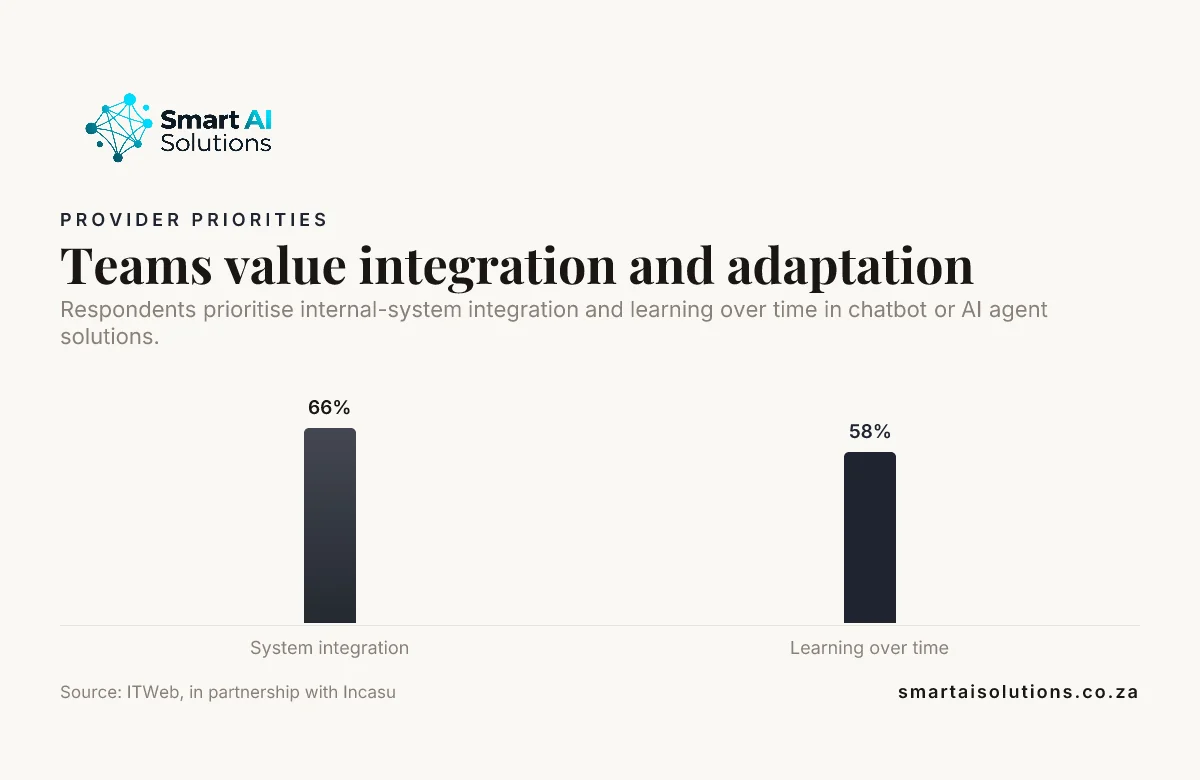
Source: ITWeb, in partnership with Incasu
Require role-based access controls, so people only retrieve or act on information they are allowed to use. If the assistant will sit across Microsoft 365 or Google Workspace, our guide to keeping permissions intact across both suites covers that part in detail. Put sensitive-data handling, retention, security responsibilities and incident ownership into the provider agreement.
Our AI Integration Services investigate your existing systems and connect the assistant through secure connections and real-time sync, or custom middleware where a system has no ready connection. The work is built and tested in stages. That suits a team that needs a clear plan for how an assistant will fit its current applications.
Get written ownership of the prompts and configuration, and of the integrations and documentation, including how your team can maintain or move them if you part ways with the provider. Otherwise the assistant isn't really yours.
Did you know? In MIT Sloan research on an AI agent built to flag adverse events from clinical notes, 80% of the work went into data engineering, stakeholder alignment, governance and workflow integration rather than the model itself. Source: MIT Sloan
Agree on instructions, action limits and human handoff
Your team will only relax around the assistant once its limits are written down. Define its role, permitted sources, output format and prohibited actions in its system prompt. With a defined remit, it is less likely to give unsupported answers or take actions nobody intended.
Specify what it does when its sources are not enough: ask a clarifying question, stop, or route the request to a named team or person. A useful handoff carries enough context for staff to carry on without making the user repeat the request.
Set approval gates for consequential actions, such as changing records or sending external messages. Start with read-only access where you can, and widen permissions only after testing shows the assistant follows the intended process.

Before the assistant goes near live work, test it for each role with common requests, ambiguous questions, conflicting source material and exception cases. Our AI Chatbots & Assistants service builds assistants this way, with the testing done before your team relies on them.
Use a representative AI proof of concept before a wider commitment
A small pilot with one team shows you how the assistant behaves before anyone depends on it. An AI proof of concept should test a small set of real tasks across the roles the assistant will support. Include routine requests, edge cases and requests that should be escalated, so nothing in the workflow goes untested.
Agree pass criteria before testing begins. Useful measures include correctness against approved sources, successful system actions, appropriate refusals, and staff time or effort saved.
Run the test with realistic data and permissions in a controlled environment. Record errors and staff feedback, then revise the instructions, knowledge sources or integrations before retesting.
Ask the provider to state what the pilot will prove, what it will not prove, and what evidence your team needs before a wider rollout. That keeps a promising demonstration separate from proof that the assistant is ready for broader use.
Plan rollout around staff, ownership and access
People adopt an assistant faster when someone inside the business owns it. Assign an internal owner for decisions, staff feedback, access reviews and updates. Without one, routine process changes leave the assistant's guidance out of date.
Involve representative staff early, give role-specific guidance, and explain when to use the assistant and when to follow established procedures or ask a person. Our AI Team Enablement service is built around a team's actual tools, workflows and industry, with role-specific training and capability measurement.

Roll out in stages, checking role permissions, escalation routes and monitoring before you extend access or connect more systems. Give staff a simple way to report errors, then record whether each update changes the instructions, the knowledge sources or the workflow.
Did you know? In the same Incasu-ITWeb survey, integration with existing systems was one of the three biggest barriers to AI adoption, named by 42% of respondents. Source: ITWeb, in partnership with Incasu
Measure results and keep the assistant current
An assistant stays useful only if someone keeps checking it against the work. Track the measures agreed for the pilot alongside failure cases, escalations, staff feedback and whether answers stay grounded in approved sources. Taken together, they tell you where it helps and where it needs fixing.
Review results with the staff who use it, then update its sources, instructions, permissions or integrations when the evidence shows a problem. Be clear about who monitors performance, applies updates and supports the team after launch.
Keep a small set of representative requests as regression tests, and rerun them whenever the instructions, knowledge or tool connections change. Test every change before it affects live work, especially changes to access, answers or actions. That way updates are tracked and tested, not a pile of informal prompt edits.
How we set it up with you
We do the setup and stay with you, so each person on the pilot team gets help with their own work from the first week. The worry most managers don't say out loud is that the assistant will give a client a wrong answer, or show someone a file they shouldn't see. It's a fair worry, so the rollout moves in three stages and you set the pace:
- Everything is drafted and you approve it. The assistant finds, summarises and drafts, and nothing is sent, changed or booked until a person approves it. Nothing reaches your customers without your approval.
- Routine tasks run on their own while you stay informed. Once the pilot shows the role and access checks hold, low-risk internal tasks can run without a click, and you see what ran.
- Hands-off, only when you choose. Some teams never move to this stage, and that's fine.
Setup is done for you: we sit with the roles in the pilot team, map their workflows, connect the approved documents and systems, and run the role-by-role tests above before anyone relies on the assistant. You see a first real result within 48 hours of go-live, and a named person checks in during the first weeks and answers quickly.
When you want a developer working inside your team through discovery and build, AI Developer Rental is from R15,000 per month. Custom assistants through our AI Chatbots & Assistants service start from R15,000 once-off setup, with the scope set after discovery.
Frequently asked questions
Questions that tend to come up while choosing a provider.
Does building a custom AI assistant mean training a model from scratch?
No. Many custom assistants use an existing model configured with instructions, approved knowledge and connections to workplace tools. Training a new foundation model is a separate, resource-heavy approach, and a provider should explain why any fine-tuning or new training is needed for your use case.
Can a custom assistant cite the internal documents it uses?
Yes. It can return references such as document titles, sections or links when the knowledge system keeps that information. Ask to see how citations appear in an answer and how your team can trace a response back to the passage behind it.
Can one assistant support multiple languages?
Yes, but test each language against its own terminology and document coverage, and listen for tone. A translation that sounds fluent can still misstate a specialised instruction, so include language-specific examples in acceptance testing.
Can a custom AI assistant work without an internet connection?
It can, if the provider designs for local or private infrastructure and uses a model available in that environment. Working offline also affects how the assistant reaches external services and receives updates, so specify which functions must keep working without internet access.
How long does it take to build a custom AI assistant?
There is no useful timeline until the provider understands the task and how ready your data is. Permissions and system connections change the answer too. Ask for a staged schedule that separates discovery, prototype testing, integration and rollout, with decision points between stages.
What is the difference between a chatbot and an AI agent?
A chatbot mainly responds to conversational requests, while an AI agent can also choose permitted tools or actions to complete a task. For a team workflow, define which actions the agent may take and which stay with a person.
Conclusion
How can I find a provider to build a custom AI assistant around our team's specific roles and processes? Begin with real tasks and evidence of how the work flows. Then check how each provider handles discovery and integration, and who looks after security and support. Test the assistant with representative work in a controlled pilot, and expand only when the results meet criteria your team agreed in advance. That's how each person ends up with help that fits their actual job.
Start with one problem: the role in one team that loses the most time to repeated questions and lookups. Our AI Chatbots & Assistants service sets up an assistant for that team first. Once it works, connect it to the systems that team updates every day through our AI Integration Services. To talk through your team's roles and processes, contact us.