The short answerAn integration project should deliver a tested workflow, documented connections and a clear handover. Agree acceptance criteria and failure recovery before the build.
The short answer
An integration project should deliver a tested workflow, documented connections and a clear handover. Agree acceptance criteria and failure recovery before the build.
What does an AI integration project typically include when connecting to existing business systems? It is more than adding a model: the work usually covers workflow selection, system and data assessment, secure connections, testing, rollout, and ongoing support.
Key Takeaways
| Question | Practical answer |
|---|---|
| Where should we start? | Choose one bounded workflow and define how we will measure its results. |
| What needs reviewing first? | Map the systems, users, data owners, interfaces, and access limits involved. |
| How does AI connect to business tools? | Use APIs, built-in features, integration platforms, or retrieval from internal documents, according to the workflow. |
| How can AI use internal information responsibly? | Provide relevant context, validate data, limit permissions, and route uncertain or high-impact work for review. |
| What should a pilot prove? | That the workflow works with realistic data, real permissions, exceptions, and system failures. |
| How can we scope a document workflow? | Map its intake, review, and recordkeeping needs, such as in automated client onboarding. |
Start with one workflow and a measurable outcome
We recommend choosing a specific process, such as qualifying a lead, routing an invoice, or classifying a document, instead of starting with a broad company-wide AI ambition. A bounded workflow is easier to map, test, and improve because the team can see where the work starts, what information it needs, and what a successful result looks like.
Set a baseline before building anything. Processing time, error rate, and the share of cases that need manual handling are practical measures for comparing the current process with the AI-enabled one.
Map who starts the workflow, which systems hold its records, and where an employee must make a decision. This shows where AI can assist, such as extracting information or preparing a recommendation, without handing it an unsuitable decision.
Assess the systems, data, and connection points
Before implementation, list the systems involved, their owners, and the user roles that access them. Identify the system of record for each important field, such as a customer address or invoice status, so that conflicting records are not treated as equally authoritative.
Then check what each system can expose or accept. APIs, built-in connectors, exports, and event notifications offer different ways to exchange data, and the available interfaces shape how direct, secure, and maintainable the connection can be.
Review sample records for missing fields, duplicates, inconsistent formats, and outdated values. An AI component can produce a plausible answer from poor input, so data readiness is part of the project rather than a separate clean-up task to postpone.
We also map data sensitivity, retention needs, and access restrictions at this stage. That lets the team limit the integration to the information needed for its defined workflow.
A systems review can uncover manual handoffs and gaps between tools before they become build problems. Our AI Integration Services Cape Town page describes connections involving ERP, CRM, POS, accounting, and legacy systems, along with data validation, exception handling, and synchronization.
Choose how the AI connects and what it can do
The right connection method depends on the operation the workflow needs, the system’s interface, and the permissions available. We compare the common approaches before choosing how the AI will read information or write changes.
| Approach | Good fit | What to plan for |
|---|---|---|
| API or built-in AI feature | A supported action in one system, such as retrieving or updating a record. | Define the allowed operations and credentials for the connection. |
| Integration platform | A workflow that coordinates several applications or transforms data between them. | Keep workflow logic visible, documented, and testable. |
| Retrieval-augmented generation (RAG) | Questions that need relevant passages from internal documents at answer time. | Retrieve the appropriate reference material and control which users can access it. |
RAG gives a model relevant internal passages when it prepares an answer, grounding the response in reference material without requiring the model to absorb every document during training. It is useful for knowledge access, while APIs and integration platforms handle structured record retrieval, updates, and workflow coordination.
Separate read actions from write actions. Start with the minimum access needed to retrieve information, then add narrowly scoped write permissions only when the workflow requires them and the consequences are understood.
For workflows that connect ERP, CRM, POS, accounting, and legacy systems, AI Integration Services is relevant because it covers AI-powered workflows with data validation, exception handling, and real-time synchronization. Keeping the intended actions explicit helps the team distinguish an AI assistant that recommends a change from an AI agent that can apply one.
Prepare and contextualise data for useful results
Data contextualization means mapping each field the AI uses to its source, meaning, and business rules. A status value, for example, needs its definition and permitted values so the AI does not confuse a draft record with an approved one.
| Data element | Context to record | Validation question |
|---|---|---|
| Customer or account field | Source system and meaning | Is the field present and in the expected format? |
| Workflow status | Business definition and allowed transitions | Does the requested change follow the business rules? |
| Time-sensitive value | Update source and freshness requirement | Is the value current enough for this action? |
Choose a synchronization approach that fits how quickly the information changes. Delayed updates can make an answer or action stale, while frequent synchronization adds operational complexity and needs monitoring.
Define how to handle conflicting records instead of leaving the AI to choose silently. The workflow can prefer the designated system of record or route a conflict for review, depending on the field and business rule.
Validate data as it moves between systems and record the result of each transfer. This makes missing, malformed, or rejected updates easier to trace and correct.
For teams that need to connect measures to their underlying records, Data Analytics & Reporting investigates business KPIs, maps them to source data, builds automated data pipelines, and deploys interactive dashboards with scheduled reports. That work supports clear definitions and traceable sources for the information an AI workflow may use.
Design safeguards, approvals, and exception handling
Give the integration the narrowest permissions that complete the workflow, with access restricted by role and action. An AI component should not inherit broad account access simply because a human user has it.
Require human approval for high-impact or hard-to-reverse actions, such as decisions that change a financial or customer record. For uncertain cases, confidence thresholds and business rules can route work to a review queue instead of letting the system proceed automatically.
Make consequential updates reversible where possible by retaining the prior value and an audit trail. That gives the team a way to investigate an incorrect action and restore the earlier state.
Connected content must also be treated as untrusted input. Test whether misleading instructions inside a document or record could override the workflow’s rules, and ensure retrieved content cannot grant itself authority to take actions.
These controls are particularly relevant when AI handles finance-related documents or compliance workflows. Our pages on reducing manual data entry and streamlining compliance reporting describe use cases where validation and review steps matter.
Test the pilot with real-world failure cases
Test with representative live-like data, real user roles, and production-like traffic. A clean demonstration with ideal records does not show whether the workflow is ready for everyday exceptions or the permissions employees actually use.
Include expected and unexpected cases in the test plan: missing fields, conflicting records, denied permissions, incorrect AI responses, and requests that should be declined or sent to a person. Check that each case reaches the right outcome and leaves a useful record for support.
Simulate delayed and failed system calls. Set bounded retries, prevent duplicate actions, and define a safe recovery path, because repeating an update without duplicate protection can create repeated changes.
Start with a limited pilot, compare its results with the baseline, and expand in stages only when quality, access boundaries, and exception handling meet agreed criteria. Business Process Automation is relevant to this phase because it includes workflow design, testing, error handling, monitoring, and team training.
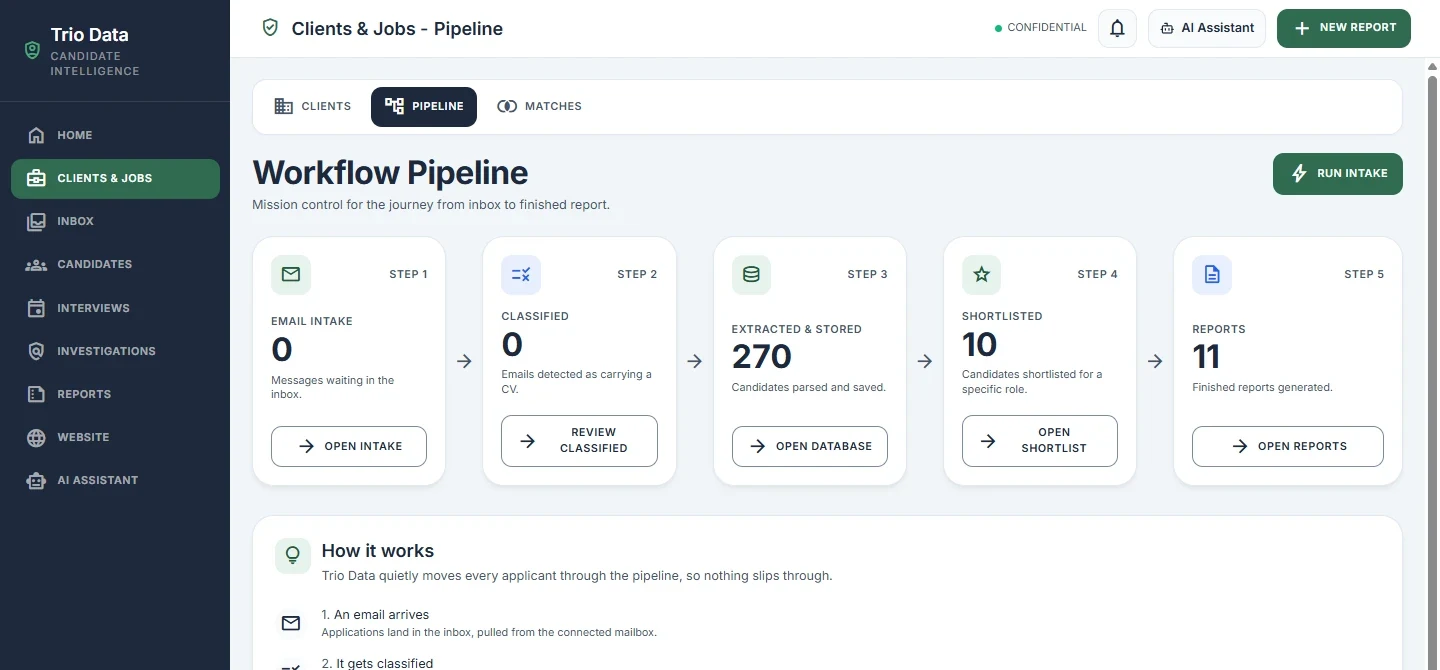
Illustrative image; not a customer case study.
A workflow pipeline view can help teams inspect how intake, classification, storage, and later steps connect. The pilot still needs its own agreed measures and test evidence.
Plan rollout, ownership, and ongoing improvement
Monitor task completion, error and exception rates, response time, and the agreed business outcome. Together, these measures show whether the integration is running properly and whether it is delivering the improvement the team set out to measure.
Assign named owners for system incidents, data issues, permission changes, model or prompt changes, and support requests. Clear ownership gives each problem a route to resolution instead of leaving it between business and technical teams.
Train employees on the new workflow, its limits, when to review AI output, and how to report problems. Adoption improves when the process fits the team’s actual work and people know what to do when the AI cannot complete a task.
Review performance and changing business rules regularly. Maintain a way to pause or roll back automation while the team investigates a fault, and include maintenance of integrations and prompts in the ongoing operating plan.
Frequently Asked Questions
Does an AI integration project require replacing an existing CRM or ERP?
No. An AI integration project can add capabilities around the systems a business already uses, keeping those systems in place as the records authority while AI supports selected tasks.
Does a business need to train its own AI model to connect AI to internal systems?
No. Many workflows can use an existing model alongside APIs or retrieval from approved internal documents. Custom model training is a separate design choice, not a prerequisite for connecting business systems.
Can an AI integration be limited to certain teams or user roles?
Yes. Access can be scoped to approved identity groups, job roles, or workflow stages, allowing a business to make the integration available to a defined team before it reaches a wider audience.
How can a business keep a manual process available if its AI service is temporarily unavailable?
Keep an alternate route for capturing and processing work, such as an existing form or queue, and define how staff will identify items waiting for AI processing. After service returns, reconcile those pending items against completed records to avoid processing the same case twice.
What should we do when a connected system changes its API?
Track API version changes and run contract tests against the updated interface before allowing production writes. If a change breaks the expected request or response format, pause the affected action until the connection passes validation.
Conclusion
What does an AI integration project typically include when connecting to existing business systems? It includes choosing a measurable workflow, assessing systems and data, selecting a connection method, setting access and approval boundaries, testing realistic failure cases, and planning rollout and support.
When we treat data quality, human oversight, and ownership as part of the build, the AI can fit into existing operations in a controlled way. Start with a clearly scoped process, prove its value in a pilot, and expand only when the workflow performs reliably.
Put the next step into practice
For the related implementation detail, read The Integration Checklist: Preparing Your Systems for AI. Bring one workflow, the systems it touches and a few representative examples to a discovery conversation.